SUBSUB VS UPSTREAM

60 extra dayson air for the same $30

Upstream charges $30 a month for every stream slot. $30 on SubSub runs 90 days — you pay by the hour, with no plan and no minimum term.

7 days, up to 3 streams. Nothing is charged when the trial ends.

Pay per hour streamed
Unlimited streams, one balance
Up to 4K60
What your budget buys
For $30 a month
90
days on air
30
days on air
SubSub Live
Upstream
+60 days
three times the airtime
Upstream published price, Nov 2026: $30 a month per stream. SubSub $0.33 a day, 50 GB library included. Days rounded down.
The short verdict

CHECKED NOV 2026
Cheaper 1080p 24/7
$10.01 vs $30 a month
SubSub
SubSub
Launch week, 10 streams × 3 days
$10.01 vs $200
SubSub
SubSub
Cost and revenue per stream
Not shown on Upstream
SubSub
SubSub
Multistream
Upstream sends to up to 10 platforms
Upstream
Verified encoder and overlays
Upstream has both
Upstream
Price and analytics → SubSub · Multistream and overlays → Upstream
See the full comparison ↓

Why creators switch from Upstream

Pay for hours, not for slots

Upstream bills $30 for every stream slot, every month. SubSub bills the hours you actually stream.

Launches cost a fraction

Ten streams for three days cost about $10 on SubSub. On Upstream that is ten monthly slots, about $200.

Analytics behind the stream

SubSub shows what each stream costs and earns next to channel and niche analytics on 2M YouTube channels.

What no other 24/7 streaming tool gives you

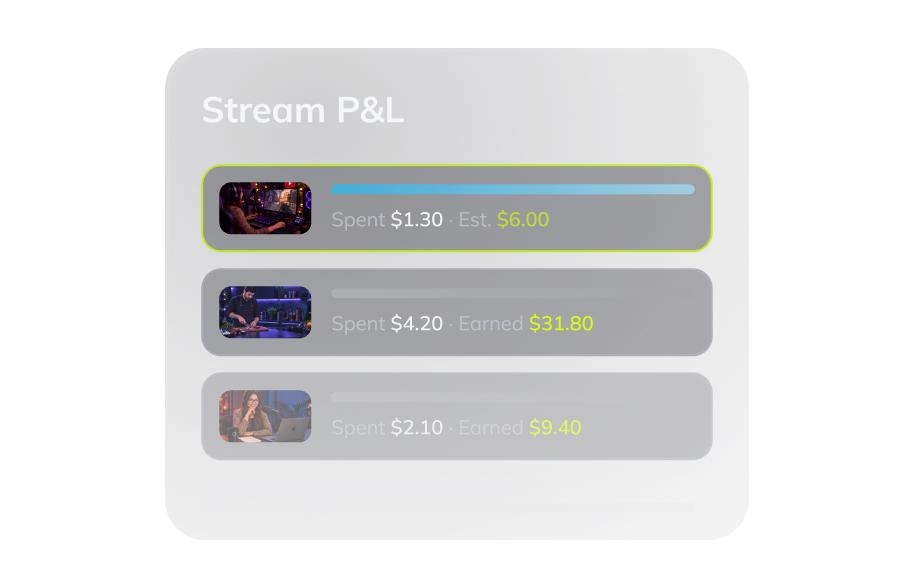
Stream P&L panel showing spend and revenue for each stream
Every stream shows its P&L

Cost and revenue side by side for every stream — estimated while it runs, final three days after it ends. Keep the streams that pay off, stop the ones that don't.

SubSub Analytics with channel and niche data
Channel and niche analytics

Your stream, your channel and your niche in one dashboard, backed by data on 2M YouTube channels. See what works before you put it on air.

SubSub Network, a YouTube certified partner network
A YouTube partner network

Help with claims and strikes and priority YouTube support for network partners. Streaming tools run your stream; SubSub also stands behind your channel.

SubSub vs Upstream at a glance

 
SubSub
Upstream
How you pay
Per hour streamed
Monthly, per stream
Always-on channel: 1 stream 24/7, 1080p, per month
$10.01
$30
Launch week: 10 streams × 3 days
$10.01
$200
A month off: nothing streaming
$1.71
$30
1 stream 24/7, 4K60, per month
$29.54
$120
Free trial
7 days, up to 3 streams, no card
24 hours a month, no card
Watermark on the free trial
None
None
Concurrent streams
Unlimited, one shared balance
One per paid slot
Cost and revenue per stream
✓
Not stated

Data checked: November 2026. SubSub prices include a 50 GB library. Upstream prices from https://upstream.so/pricing. Not stated means the competitor's site does not say.

Switch from Upstream in about 5 minutes

No migration call and no export. Copy your stream key, upload the videos you already loop and go live. Keep your current plan until you are sure.

✓
Pay per hour on air, so there is no plan to fit your channels into
✓
7-day trial: up to 3 streams, no card
✓
Set start and end times and SubSub keeps the loop running 24/7
Switch checklist
FREE TRIAL
Stream key
Key and RTMP URL pasted
READY
Videos
Files uploaded, SubSub converts them
READY
Schedule
Start and end time set
OPTIONAL
Go live
24/7 loop running
LIVE
Moving many channels?
Talk to us
Start free →

Real channels. Real growth. From videos they already had.

Mr. Clabick channel avatar
Mr. Clabick
+54%
subscribers
Serhiy Mamaiev channel avatar
Serhiy Mamaiev
2.1×
watch time
Cuddle Buddies channel avatar
Cuddle Buddies
+$14.5K
revenue
TOP DOGS channel avatar
TOP DOGS
3.6×
subscribers
Start streaming for free

Other comparisons

Questions people ask before switching

Is SubSub a good Upstream alternative for 24/7 streams?

Yes. SubSub runs 24/7 YouTube streams from your videos in the cloud and bills only the hours you stream, so one 1080p stream costs about $10 a month including a 50 GB library.

Can I move my Upstream playlists to SubSub?

Upload the same video files to the SubSub media library, build a playlist and start the stream. SubSub converts files that are not ready for streaming.

Do I need a card to try SubSub?

No. The free trial runs 7 days with up to 3 streams, no card, and nothing is charged when it ends.

Start your first 24/7 stream today — no card, no Upstream subscription.

Hourly billing, a week to try it without a card, no watermark and unlimited streams on one balance — with channel analytics and a YouTube partner network behind you.

Start free — no card