There are more AI tools now than you could ever test, and new ones show up every week. This guide gathers the best AI tools for YouTube creators 2026 has to offer. But none of them has an idea of its own. A tool removes the routine and the technical limits, but what the story is, who it's for, and what tone it strikes are up to you.
Below we've gathered seven interesting AI tools for YouTube, from AI tools for YouTube content creation to full production. Some were discussed at APOS 2026, Asia's main media summit; others are our own recommendations. Together they add up to the best AI tools for YouTube video creation and cover the full workflow: from idea to video, text, and the final visual.
Claude
Claude by Anthropic acts as the brain of the whole stack. It's a large language model you think with: you come up with a logline, build the script structure, write dialogue, repackage one piece of material for YouTube, Reels, and an article, go through viewer comments, prepare a brief or research. Claude keeps large volumes of text in view, so it's comfortable to work on a whole project with it rather than on separate lines.
The most interesting part is the connectors. Claude connects to Google Drive, Gmail, Calendar, spreadsheets, and other services and starts working inside your workspace: it finds the right file among hundreds, reads documents and spreadsheets (including those on Google Drive), cross-checks figures from several sources, and answers questions across your entire archive, like a personal assistant who has already read all of it. Some connectors are read-only: Claude analyzes and advises without changing anything. Others can also take actions: draft an email, add a calendar event, create a task. In those cases Claude always shows first what it's about to do and waits for your confirmation before sending or publishing anything. The list of services isn't limited to Google's set: it includes Notion, Slack, Asana, Linear, Figma, Canva, and more.
Key capabilities:
Working on a whole project rather than on separate lines: scripts, briefs, research
Developing ideas and structuring the concept
Analyzing documents, transcripts, and audience feedback
Connectors to Google Drive, Gmail, Calendar, and spreadsheets: finding and analyzing your files right in the chat
Writing and running code for small automations, no programming skills required
Best for: screenwriters, producers, and marketers who want to think through ideas, write texts, and quickly find what they need in their own documents.
OverseerOS
OverseerOS is a YouTube strategy and production workspace for creators who want to turn research into a repeatable content system rather than start every video from a blank prompt.
Paste in a public YouTube channel, and OverseerOS analyzes its visible content and performance patterns. It organizes the findings into a structured blueprint covering recurring topics, title formulas, thumbnail principles, hooks, pacing, tone, video structure, upload rhythm, and opportunities the channel has not yet explored.
Unlike a standalone analytics tool, OverseerOS carries the research into execution. Its Reverse Engineer Lab helps creators study successful titles, thumbnails, hooks, SEO, transcripts, outlines, and retention techniques. Channel Pulse surfaces new opportunities, CreatorDNA helps maintain a consistent voice, and the Content Planners, Script Studio, and Thumbnail Cloner turn the strategy into original videos.
The goal is not to copy another creator. It is to understand why a format works, identify the repeatable strategy behind it, and apply those lessons to your own ideas, voice, and audience.
Key capabilities:
Turn a public YouTube channel into a structured strategy blueprint
Analyze recurring topics, titles, thumbnails, hooks, pacing, tone, and video structure
Reverse engineer successful titles, thumbnails, SEO, scripts, and retention patterns
Discover breakout content and untapped topic opportunities
Move research directly into content planning, scripts, titles, and thumbnail creation
Maintain a consistent creator voice with CreatorDNA
Best for: YouTube creators, faceless channel operators, agencies, and multi-channel teams that want a repeatable content workflow built from real public signals instead of generic AI suggestions.
The OverseerOS Reverse Engineer Lab helps creators study successful YouTube titles, thumbnails, hooks, SEO, video structure, and retention patterns in one workspace.
Magnific
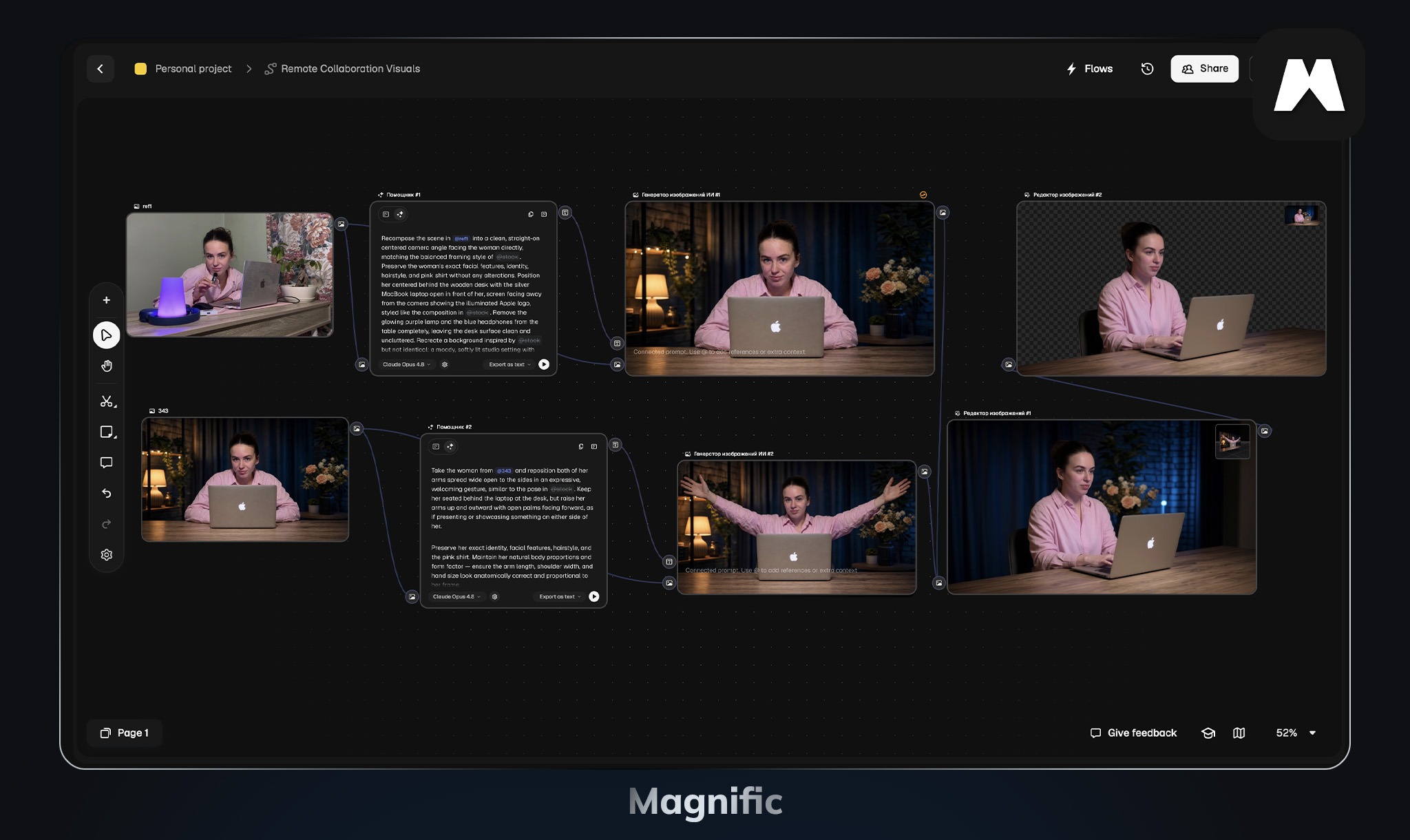
Magnific makes images sharper and more detailed. It increases resolution up to 16x and fills in what was missing in the original file: skin, hair, fabric, highlights. How much to add is up to you, via the creativity slider and prompts, from a light cleanup of the frame to a full repaint.
Besides upscaling, Magnific has other tools. Relight changes the light and color in the frame, Style Transfer carries a style over from another image, and Mystic creates pictures from text. There's even a separate video upscaler: it raises video to 4K in two modes, Creative for generated or low-quality footage and Precision for real footage, where it's important not to distort anything.
Magnific is most often used at the end of the process: to raise the quality of a frame from a video model, finish a 3D render or concept art, prepare photos and illustrations for print. The tool was founded in 2023, and in May 2024 it was acquired by the Freepik platform.
Key capabilities:
Photo upscaling up to 16x with detail reconstruction
Video upscaling up to 4K (Creative and Precision modes)
Relight: change the light and color in the frame
Style Transfer: carry a style over from another image
Mystic: create images from text
API to embed into your own process
Best for: photographers, illustrators, designers, and video creators who care about the quality of the final picture.
Lispr
Lispr is a voice-typing app for Mac and Windows. You hold a hotkey, speak, release, and what you said appears as text wherever the cursor is, in any program. Recognition covers around 99 languages, and if you press a second key while speaking, Lispr types not the original but a translation, into one of 32 languages. It works fast, recognizing a phrase in roughly a fraction of a second.
For an author it's a quick way to dictate script drafts, descriptions, ideas, and notes instead of typing them by hand, in different languages too. On privacy, the developer (Codebridge Technology) states that audio is sent over an encrypted channel only for recognition, after which it is deleted and not used to train the model.
Key capabilities:
Voice typing in any app via a hotkey
Recognition of around 99 languages
Translation while dictating into 32 languages
Fast recognition, roughly a fraction of a second
Audio isn't stored and isn't used for training
Best for: authors and screenwriters who find it faster to say a thought aloud than to type it, and for those working in several languages at once.
OutlierKit
OutlierKit is a YouTube analytics tool built for competitor research. Enter any channel, your own or a rival's, and it scans the thousands of channels around it to work out what is working in that niche.
It measures every video against its own channel's usual numbers. A video with 40,000 views on a channel that normally gets 5,000 is worth studying. A video with 2M views on a channel that normally gets 5M is not.
Key capabilities:
Competitor Studio: benchmarks you against the channels you actually compete with, and shows which of them are growing
What to make next: the topics, titles, angles and video lengths that are working across the niche
Audience pain points: what viewers keep asking for and keep complaining about, pulled from comments across the niche
Sponsor and monetization intelligence: which brands are already paying in your niche, and how channels earn beyond ads
Outlier Finder and Niche Explorer: videos beating their own channel's numbers, and topics nobody has covered properly
A REST API on the Pro and Max plans, so AI agents and automations can pull the same data into your own workflow
Best for: creators, strategists and agencies who want to choose topics and formats from competitor data rather than instinct.
Price: free trial with 10 credits, no card. Hobby from $16.60 a month, Pro from $24.90, Max from $83, billed annually. Competitor Studio needs Pro or Max. https://outlierkit.com
Kling AI
Kling AI, from the Chinese company Kuaishou, generates video and ranks among the best AI tools for YouTube video creation 2026 has to offer. It launched in June 2024 and has been updated many times since. The current Kling 3.0 makes video in 4K, with multi-shot sequencing and lip-synced dialogue in several languages.
At the summit, Kling's head of global partnerships, Melody Hou, spoke about the project's scale: over 100 million users worldwide and tens of thousands of business clients. She divided the clients into three groups: advertising studios and agencies, professional film and TV creators along with the microdrama market, and the gaming industry with UGC authors. In her words, Kling is already rewriting individual stages of production, from the jump between an idea and a draft frame to post-production and visual effects. Two examples from the stage. In the series "House of David" on Amazon Prime Video, a large share of shots were made with AI, and viewers can't tell them from real footage. Several tools worked together there: Kling and Runway generated video, Midjourney created images, and Magnific and Topaz raised the quality. The second example: the viral "Korean Baseball" effect on Kling 3.0 pushed the app to the top of the App Store in dozens of countries at once. For short-form work, it's one of the AI tools for making YouTube videos quickly.
Key capabilities:
Video generation from text and from an image
Multi-shot filming and character consistency
Lip-synced dialogue in several languages
Enterprise API for teams
Best for: advertising agencies, film and TV producers, microdrama creators, and gaming studios.
Utopia: one of the topics at APOS 2026
Utopai is an AI studio, and its product PAI is a system that turns text into a whole film. You upload a script or a description, and PAI splits it into scenes and shots on its own and creates quality video in 4K up to three minutes long, keeping the same characters and the same world from the first shot to the last.
PAI differs from ordinary video generators in a few ways: Utopia has a "story agent" that makes sure the character, setting, and style don't change from shot to shot. Before generation you choose the key frames, and then the video is built around them, so you see in advance what the result will be. And in Pro mode there's Canvas, a shared workspace where the script, characters, storyboard, and finished scenes sit in one window, and any part can be reworked or generated again. At APOS the approach was explained through an orchestra: the separate AI models are the musicians, each with their own instrument, and PAI works as the conductor that brings them together. In spring 2026 the studio was valued at roughly a billion dollars.
Key capabilities:
From text to film: PAI splits the script into scenes and shots itself
Long video up to 3 minutes in 4K with the same characters and world
The "story agent" keeps characters, places, and style consistent across shots
You approve the key frames before generation to control the result
Canvas (Pro mode): script, storyboard, and scenes in one window, any part can be reworked
Best for: studios, production teams, and authors working on long premium content.
Conclusion
No matter how many new AI tools appear, even the best AI tools for YouTube, the final result always stays yours. Don't try to grab everything at once: take one tool, try it on a specific task, and figure out what exactly it does for you and how it makes your work easier. Once you've mastered one, move on to the next.
Tools only execute - ideas are born in you. Think, experiment, and you'll surely come up with something brilliant.



.jpg)