So, you’ve been uploading videos and eagerly waiting for that sweet monetization approval. But keeping up with YouTube’s ever-changing requirements can be overwhelming, especially when its algorithms shift unpredictably, like a restless cat that just won’t sit still.
And the frustration is real: imagine racking up 18M views and getting absolutely nothing for it. That's the kind of pressure creators are venting about right now, with the community split on whether stricter rules will finally curb low-effort, AI-generated content or just squeeze out niche creators in favor of broad, viral-style videos.
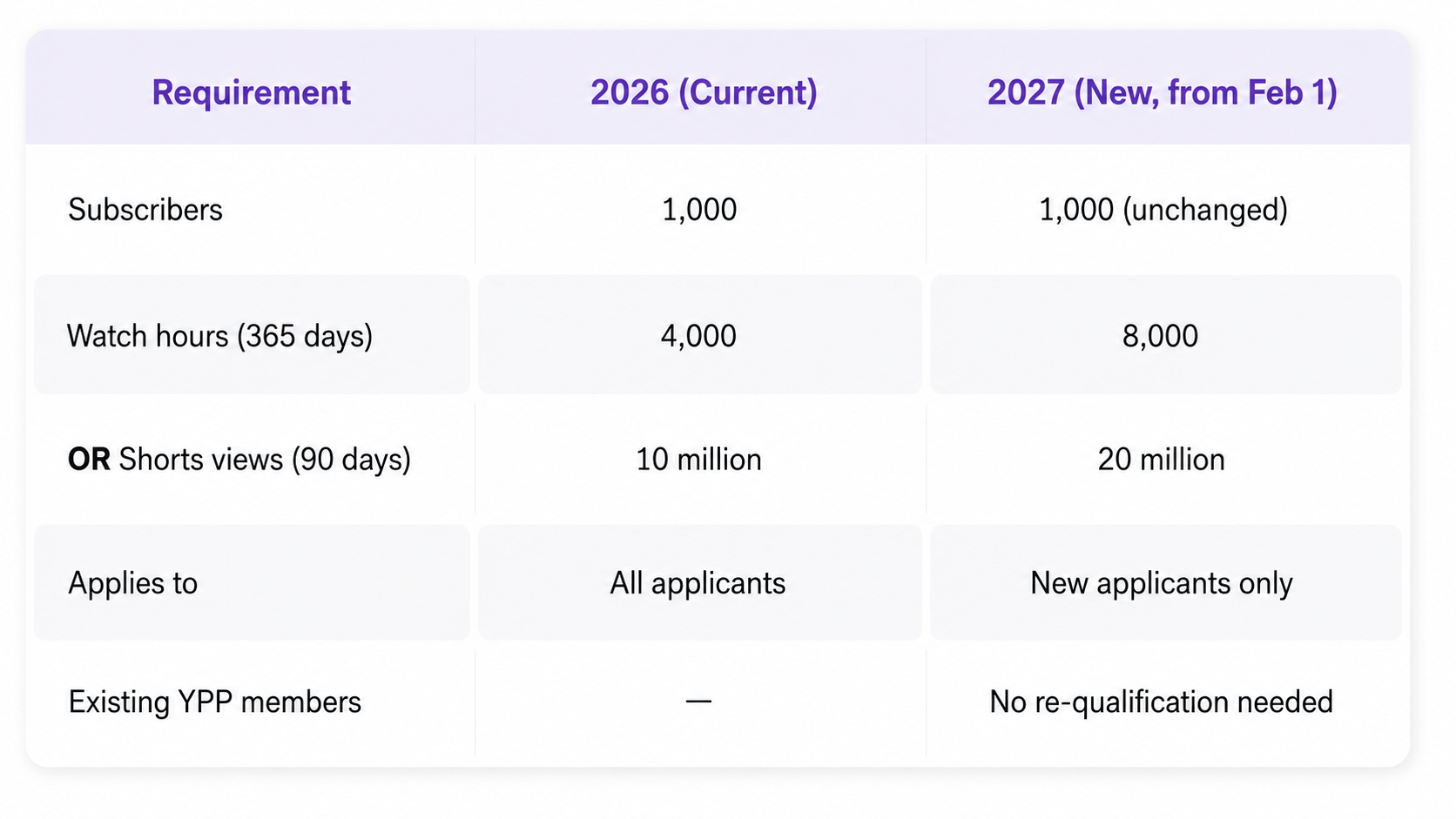
That pressure is about to intensify. YouTube monetization is about to change in 2027, and it’ll raise the bar considerably for anyone applying to the program for the first time. Here's the change fueling the debate: from February 1, 2027, new creators seeking ad and YouTube Premium revenue will need 1,000 subscribers plus either 8,000 qualified public watch hours in the last 365 days, or 20 million qualified Shorts views in the last 90 days. That's double the previous thresholds of 4,000 watch hours and 10 million Shorts views, a much steeper climb for anyone just starting out.
There's good news if you're already in the Partner Program. Here's exactly what's changing starting in 2027, what's not, and what it means for you.
YouTube Partner Program Requirements 2027 at a Glance
Mark your calendar: February 1, 2027 is when YouTube flips the switch on tougher YPP entry rules. New creators will need to work twice as hard to unlock ad and Premium revenue.
But here's the good part: it's an either/or deal, not a both/and. That means you need to hit the watch-hour mark or the Shorts-view mark, and you're in. So, no need to grind out both.
YouTube is roughly doubling the entry requirements for creators applying to earn ad and Premium revenue for the first time. The 1,000-subscriber threshold isn't going anywhere, but the watch-hour and Shorts-view bars are climbing sharply.
What Happens to YouTube Monetization in 2027?
Starting Feb 1, 2027, you'll need to maintain 10 million Shorts views every 90 days to keep earning from Shorts, plus meet at least one activity threshold: 1,000 watch hours a year, 1 million Shorts views in 90 days, or just upload 2 long-form videos or 5 Shorts every quarter.
Yes, the bar's rising, but it's not a double-whammy. Just pick your lane: long-form watch hours or Shorts views and focus your energy there instead of chasing both.
Fan Funding Tier:
Requirements:
Subscribers: At least 500.
Public Watch Hours: 3,000 hours in the past 12 months.
Content Uploads: Minimum of 3 public videos in the last 90 days.
Monetization Features: Fan Funding—access to features like Super Chat, Super Stickers, and channel memberships. These allow your fans to support you directly—think of it as a virtual tip jar.
*Important note: This tier unlocks fan-support and commerce-related features, but it doesn’t include full ad revenue sharing or Premium revenue sharing. Those need to meet the higher requirements of the standard YouTube Partner Program monetization tier stated above.
YouTube's cheaper, ad-free tier is expanding to every country where Premium is available. The money from subscriptions gets split into separate pools: creators keep 60% of net revenue from Premium Lite and 30% from standard Premium.
Inside those pools, long-form creators take the bigger slice at 55%, while Shorts creators get 45%. All of it shows up right alongside your regular Premium numbers in YouTube Analytics.
Shorts creators get new ways to cash in
If an advertiser targets five channels or fewer, eligible creators can pocket a direct 45% revenue share from those placements, on top of whatever they're already earning from the general Shorts Creator Pool.
YouTube's also teasing extra bonuses tied to Shopping, brand deal production credits, and cultural trend activations, with full details expected to land alongside the February 2027 rollout.
What Happens to Existing YouTube Partners?
Existing YPP creators don’t need to meet the new entry requirements. If you’re already in, you stay in; no need to claw your way back to 8,000 watch hours.
Long‑form ad revenue keeps rolling in under the same setup, as long as your channel continues to play by YouTube’s rules and policies.
Under the new YouTube Shorts monetization requirements, if you drop below 10M Shorts views, don't panic! You won't get kicked out of YPP. You'll still earn from your long-form content just fine.
The need for 20M Shorts views in the past 90 days (along with meeting subscriber requirements) is only for new creators who want to enter YPP through Shorts after February 1st 2027.
What pauses is your Shorts revenue specifically, and it kicks back in the moment you reach over 10M qualified Shorts views in a rolling 90-day window. It’s like a maintenance bar, not a new entry test, as existing partners aren't starting from scratch here.
Staying "active" counts too. Starting February 1, 2027, YouTube wants proof your channel is still alive and kicking. You're covered if you hit any one of the requirements listed above (1,000 qualified watch hours over the past year, 1 million Shorts views in the last 90 days, or 2 long-form videos or 5 Shorts uploaded every quarter).
Go quiet for 6 months with zero uploads or posts, and you risk getting dropped from YPP under existing rules, though if you slip below the activity bar, you now get a 90-day grace period to bounce back before anything happens.
Why Is YouTube Changing the Monetization Requirements?
YouTube’s official statements for shaking things up are related to sustainability, quality, and catching up with how people actually watch now. The numbers seem to back this up, too.
Today, YouTube roughly counts 200 billion Shorts views a day and over a billion hours of YouTube watched on TVs daily. The old thresholds were set for a totally different era. By bumping them up, YouTube is saying that full ad and Premium revenue should go to channels with real, sustained audiences.
Plus, YouTube's VP of Creator Product, Amjad Hanif, has stated that creators’ goal should be real income, not pocket change. Channels hitting 8,000 watch hours or 20M Shorts views tend to have the RPM and volume to actually make monetization worthwhile as a business. Raise the bar, and you shrink the pool of creators earning next to nothing while concentrating payouts on people with audiences that can scale.
As for Shorts, this has been YouTube's biggest growth story and its trickiest monetization puzzle. Shorts pull in massive view counts but have historically earned less per view than long-form. So YouTube's threading the needle to keep Shorts earnings flowing, then sweetening the deal with new opportunities like targeted ads, bonuses, and shopping tie-ins.
The message to creators is clear: build a real Shorts audience, don't just chase one-off viral hits, and treat Shorts as one piece of a bigger business. It's YouTube’s way to keep creators invested in Shorts while keeping a lid on payout costs for a format that's huge in volume but light on ad value per view.
What Creators Should Do Before February 1, 2027
If you're already in the YouTube Partner Program, mark your calendar for January 31, 2027 – a Sunday. That's your deadline to accept YouTube's updated monetization terms in Studio, or your earnings take a hit starting February 1.
The terms cover three modules (whichever apply to you):
Commerce Product Module (if you sell products through YouTube)
In case you miss the deadline, you won't get kicked out of YPP. But you will stop earning from whichever features tie to the modules you skipped. The fix is simple, though: accept the terms whenever you're ready, and earnings kick back in.
How to accept:
Open YouTube Studio (desktop or mobile)
Look for the terms notice on your dashboard or under Earn
Hit Review on each module.
Check the acceptance box, click Next
Submit once you've gone through them all.
Running a multi-channel network. Owned-and-operated channels get accepted automatically by your network. However, affiliate channels don't, as each one has to be accepted individually or lose monetization of the associated features.
This won't happen overnight. Terms roll out over the coming days, with alerts via email and Studio. But if you don't wait for the reminder, you can check Studio now and get ahead of it.
As a quick action checklist:
If you’re close to 4,000 watch hours or 10M Shorts views, apply now under the current requirements before thresholds shift.
If you’re Shorts-focused, watch the new 10M-views/90-day threshold closely.
If you’re not close to monetizing yet, reassess whether long-form or Shorts fits your growth path better.
Are the New Requirements Related to AI Content?
Let's clear this up: the 2027 YouTube Partner Program changes aren’t an AI crackdown. They apply to every creator equally, whether you're filming with a camera or scripting with ChatGPT.
YouTube has already tightened its AI‑related monetization and disclosure rules in July 2025 and May 2026. If your channel leans heavily on AI, those policies can block monetization entirely, even if you hit every new watch‑time or Shorts‑view requirement.
AI tools have made content cheaper and faster to produce, as scripting, editing, and translation have all sped up. That's led to a wave of mass-produced uploads flooding the platform.
But YouTube's response isn't to single out AI; it's to raise the bar for everyone, so real audience engagement will matter more than raw volume.
AI-made videos are fine under the new rules, as long as they meet YouTube's existing standards: original, authentic, non-repetitive, and properly disclosed when using realistic AI alterations. Channels running on templated AI voiceovers or duplicate scripts were already vulnerable under YouTube's "inauthentic content" policies; the 2027 thresholds just add another layer creators need to clear.
So, this update is about sustainability and engagement, not AI policing. If you use AI responsibly and meet the same watch-time or Shorts-view bar as everyone else, you're in the clear.
Adherence to YouTube Policies: Playing by the Rules
Meeting the numbers is only half the battle; YouTube still expects your channel to stay in good standing on every other front before you start seeing those dollar signs. So, you need to take into account:
Community Guidelines: keep it clean, respectful, and original. Avoid content that could be considered harmful or inappropriate.
Monetization Policies: ensure your content is advertiser-friendly. Steer clear of excessive profanity, violence, or controversial topics.
Copyright: use only content you own or have permission to use. That catchy song you love? Make sure you use royalty-free music or get proper licenses before adding it to your video. You can use copyrighted music on YouTube without a monetization goal, but you’ll risk having YouTube's Content ID system detect copyrighted music. With the ads placed on your video, the revenue will go to the copyright owner. In worse cases, your video might be blocked.
FYI, YouTube's review team will assess your channel's compliance before granting monetization. So, dot your i's and cross your t's!
How to Turn On Monetization on YouTube
If you’re new to the game and ready to start earning, here's how to flip the switch on your channel.
1. Access YouTube Studio
Sign in to your YouTube account. Click your profile picture in the top-right corner. From the dropdown menu, select YouTube Studio.
2. Go to the Monetization Tab
In YouTube Studio, locate the left-hand menu. Click on Monetization to check your eligibility.
3. Apply for the YouTube Partner Program (YPP)
If you meet the requirements, an "Apply Now" button will appear. Click it to begin the application process. Read and accept the YPP terms and conditions.
4. Set Up Google AdSense
You’ll be prompted to create or link an existing Google AdSense account. Follow the on-screen instructions to complete the setup.
5. Wait for YouTube’s Review
YouTube will review your channel to ensure it follows community guidelines and monetization policies. The review process can take between 1-3 days and up to a month, so patience is key.
6. Enable Monetization on Your Videos
Once approved, go to YouTube Studio to turn on monetization for individual or all videos. Open YouTube Creator Studio and navigate to the "Earn" tab from the left-hand menu.
7. Verify Your Identity & Payment Details
To receive earnings, you must verify your identity and address through YouTube. Follow the verification process to complete the monetization setup. Now, you’re all set to start earning from your YouTube content!
How Long Does It Take to Monetize a YouTube Channel
Turning your YouTube channel into a money-making machine isn’t just about hitting “upload” and hoping for the best. Success depends on key factors like content quality, posting consistency, and how well you keep your audience hooked.
The timeline for monetization can go from a few months to a couple of years, depending on your niche and how quickly your channel gains traction. But if you want to speed things up, here’s what helps:
Stay consistent – Regular uploads keep your audience engaged and attract new viewers.
Make content that matters – Whether it’s entertaining, informative, or both, focus on delivering value.
Optimize for search – Use the right keywords, attention-grabbing titles, and eye-catching thumbnails to boost visibility.
Promote wisely – Share your videos on social media, collaborate with other creators, and engage in relevant online communities.
Reaching YouTube’s Partner Program requirements isn’t an overnight win, whether you're working toward today's thresholds or the higher bar arriving with the YouTube monetization changes in 2027. It takes time, patience, and a whole lot of trial and error. Keep refining your approach, stay persistent, and growth will follow.
Diversify Your Revenue Beyond Ads
And once you’re monetized, don't stop at ad revenue alone. Explore additional income streams:
Channel Memberships: Allow access to exclusive perks to subscribers who pay a monthly fee. Think behind-the-scenes content, custom emojis, and more.
Merchandise: Use the merch shelf to sell branded products. Your fans can rock your gear while supporting your channel.
Super Chat and Super Stickers: During live streams, viewers can purchase these to show support and get noticed. It's like getting a virtual high-five!
YouTube Sponsorship Deals: Partner with brands to promote their products or services in exchange for payment.
Affiliate Marketing: Earn commissions by promoting products through tracked affiliate links in your video descriptions.
Fan Funding: Receive direct financial support from viewers through YouTube memberships or SubSub Fan Funding.
Pro Tip
Engage with your community. Respond to comments, host live Q&A sessions, and make your viewers feel valued. A loyal audience is more likely to support you financially.
How to Tell if a YouTube Channel Is Monetized?
As a YouTube creator, knowing whether a channel is monetized can help you understand its revenue strategies, evaluate competition, or decide on potential collaborations. One clear sign is the subscriber count (at least 1,000 subscribers). More ways to check include:
YouTube Monetization Checker Tools: Websites like YT Large and YTface tools that can analyze a channel's monetization status by checking for ads, subscriber count, and other indicators.
Channel Features: If a channel has a "Join" button, that means it’s part of the YouTube Partner Program.
Presence of Ads: Channels with many videos containing ads are likely monetized. However, this isn't a definitive indicator since some channels may choose not to monetize despite meeting the requirements.
Maximize Your Earnings With SubSub
Relying solely on YouTube AdSense can be unpredictable. Ad revenue fluctuates, and even with a successful channel, earnings aren’t always stable. That’s where SubSub steps in—offering a diverse ecosystem that helps creators unlock new revenue streams and build a more sustainable income.
Let’s break down how SubSub’s products can help you go beyond traditional ad earnings and take your monetization to the next level.
SubSub Partner Program – Premium Perks & Expert Guidance
Making money on YouTube (or any platform) isn't just about hitting the right numbers—it’s about knowing how to scale. Whether you’re at the beginning of your YouTube journey or simply need a hand with growing your channel, the SubSub Partner Program gives you the precise insights and tips you need.
This program connects you with monetization experts who offer insights on growing revenue, optimizing content, and accessing premium earning opportunities. From personalized assistance to enhanced monetization options, you’ll have everything you need to grow faster and earn more.
Join SubSub as a partner and you get access to:
Direct YouTube support—connect with a dedicated personal manager to help navigate YouTube’s policies and optimize your content strategy, and better understand updates related to YouTube Partner Program requirements in 2026.
Access to many helpful features—including SubSub Fan Funding to grow your community and direct fan revenue and SubSub Analytics to easily track competitors, analyze trends, and optimize content.
Flexible withdrawal conditions with SubSub Wallet—track, optimize, and withdraw earnings with just one tap.
If you’re serious about turning content creation into a full-time career, this program helps you make smart, data-driven decisions to boost profitability.
SubSub Fan Funding – Turning Your Audience into Supporters
Setting up a fan funding page is complex, overwhelming, and can limit your earning potential. With SubSub Fan Funding, your audience can contribute directly to your work, giving you a reliable income source outside of ads.
Whether it’s one-time tips, recurring memberships, or exclusive content access, SubSub makes it easy for viewers to show their appreciation.
Here are the basics of how it works:
Set up your personalized SubSub Fun Funding page.
Offer exclusive videos and rich media to fans.
Fully customize pages, pricing, and discounts.
Encourage your fans to support your work (donations, memberships, and shop sales).
Fan Funding’s main benefit is that you can focus more on content and less on chasing high CPMs (cost per mille). Plus, it builds a stronger community—when fans invest in your success, they become even more engaged in your content.
SubSub Live – Monetize Your Content 24/7
Live streaming has become a massive revenue driver, but what if you could keep the cash flowing even when you're not live? That’s exactly what SubSub Live does. It allows creators to automate 24/7 streams, running curated content loops to engage viewers around the clock.
With SubSub, you can automate your streams, ensuring non-stop engagement and revenue—even while you sleep.
Run pre-recorded videos as live streams, and you can keep your audience entertained 24/7 while continuing to earn through ads, donations, and super chats. It’s a simple process:upload your content, set a recurring stream schedule, and let SubSub handle the rest.
Whether you have a library of past content ready to be reused or want to maintain a constant online presence, automated streaming keeps your channel active and profitable without constantly being on camera.
One of the biggest frustrations for creators? Waiting for payments. YouTube’s monthly payout schedule isn’t always ideal, and handling multiple revenue streams across different platforms can get messy. SubSub Wallet solves both problems by offering instant payouts and an easy way to manage earnings from various sources into one easy-to-use dashboard.
With instant withdrawals, you can access your funds anytime—directly to your bank account, PayPal, Payoneer, or even crypto wallets. If you need money before your YouTube payout, SubSub offers advance payments so you can stay ahead.
Whether you’re earning from fan funding, brand deals, live streams, or multiple platforms, SubSub Wallet simplifies the process. Creator, influencer, or business owner—you get paid faster and can focus on what matters most: creating great content.
Stay on Top of YouTube Monetization Requirements Updates
With so many YouTube monetization changes in 2027 already on the calendar, staying informed is non-negotiable. YouTube loves a good plot twist—just when you think you’ve got it all figured out, BAM! A new policy update. Stay ahead of the game (and avoid surprise demonetization) with these simple moves:
Regularly check YouTube's official blog: It's the go-to source for all platform news.
Join creator communities: Network with fellow creators to share tips, experiences, and support.
Attend YouTube workshops and webinars: These can provide valuable insights and help you stay ahead of the curve.
Final Thoughts
The YouTube Partner Program requirements are doubling for anyone applying fresh after February 1, 2027. That's the part worth sitting with: if you're not yet in the program, the smartest move is to get in under the current thresholds while you still can, rather than waiting and facing a much steeper climb next year.
If you're already a partner, the picture is different. You won't be held to the new entry bar, but you do need to accept the updated terms by January 31, 2027, keep Shorts views above the 10-million maintenance threshold if that's your revenue stream, and stay active enough to avoid losing your status. None of it is drastic, but it does mean paying closer attention to your numbers over the next few months than you might be used to.
Focus on creating content you're passionate about, engage authentically with your audience, and the numbers will follow.
If you want to grow your income and feel more financially secure as a creator, SubSub’s ecosystem makes things a lot easier. Instead of depending only on ad money, you get access to fan support, nonstop monetization, expert help, and instant payouts, all built to boost your earnings and make monetizing your content way simpler.
Just remember that every big creator started small. Keep pushing, stay creative, and regularly check YouTube's official guidelines, including the evolving YouTube Partner Program (YPP) eligibility requirements. The rollout continues, since the exact terms and thresholds could still shift between now and February 2027.
YouTube Partner Program Requirements 2027 FAQs
Do you need 8,000 watch hours to monetize YouTube?
No, you don’t automatically need 8,000 watch hours to monetize. That requirement applies only to the main YPP tier that unlocks full monetization features. YouTube will still offer the lower access tier at 500 subscribers, which doesn’t require 8,000 hours. But to earn ad revenue on long‑form videos, you’ll need to meet the new 8,000‑hour threshold starting February 2027.
How many Shorts views do you need to monetize YouTube channels in 2027?
You only need 20 million Shorts views if you want to qualify for full YPP monetization through Shorts performance. It’s one of the two main eligibility paths: either 8,000 long‑form watch hours or 20M Shorts views within 12 months. If you don’t hit 20M, you can still monetize through the long‑form path or remain in the 500‑subscriber access tier.
Do existing YouTube channels need 8,000 hours?
Yes. Starting February 1, 2027, all creators in the main YouTube Partner Program (YPP) tier must meet the updated requirements. If you’re already monetized, you’ll need to maintain 8,000 long‑form watch hours or 20M Shorts views in the previous 12 months to keep full monetization privileges. You won’t lose your channel, but your monetization features may adjust based on your eligibility.
What happens if you don’t get 10 million Shorts views?
If your Shorts views fall below 10 million, you simply won’t qualify for the Shorts‑based path to full YPP monetization. You can still monetize if you meet the long‑form requirement instead. And you won’t lose access to the 500‑subscriber tier; your channel remains eligible for basic tools, though not full ad revenue features.
Can you still monetize YouTube with 500 subscribers?
Yes, the 500‑subscriber tier is staying. It still grants access to features like channel memberships, Super Thanks, and shopping tools. What’s changing is the main monetization tier above it, which now requires 8,000 watch hours or 20M Shorts views. So the entry tier remains intact, but full monetization becomes more demanding.
What happens if I'm close to 4,000 hours before February 2027?
If you’re nearing 4,000 hours, you’ll still be able to enter the main YPP tier before February 1, 2027 under the current rules. But once the new policy takes effect, you’ll need to meet the updated 8,000‑hour requirement to maintain full YouTube monetization. Your existing status won’t stay in place automatically; you’ll need to meet the new requirements to keep full monetization.
Will YouTube demonetize inactive channels?
YouTube won’t demonetize channels simply for being inactive. However, if you stop meeting the new eligibility requirements, like falling below 8,000 watch hours or 20M Shorts views; you may lose access to full monetization features. Your channel remains intact, and you can requalify anytime by meeting the updated thresholds again.
Does the new policy target AI-generated content?
No, the updated YouTube monetization requirements for 2027 don’t specifically target AI‑generated content. They focus on overall channel performance, regardless of how videos are created. AI content is still allowed as long as it follows YouTube’s broader policies on originality, transparency, and avoiding spammy or repetitive uploads. The new thresholds apply equally to human‑made and AI‑assisted content.





%20(1).png)
.png)


%20(1).jpg)
.jpg)
%20(1).jpg)