A cooking channel prepares 2 thumbnails for a new recipe. One shows the creator tasting the dish, the other shows the dish in close-up. Both look good, and you can't tell by eye which one will bring in more viewers. Until recently, creators had no way to check, so they guessed, asked friends, or swapped thumbnails at random.
Now YouTube answers the question itself. It shows up to 3 versions to different viewers at the same time, measures how long people watch after they click, and picks the winner.
What is A/B Testing
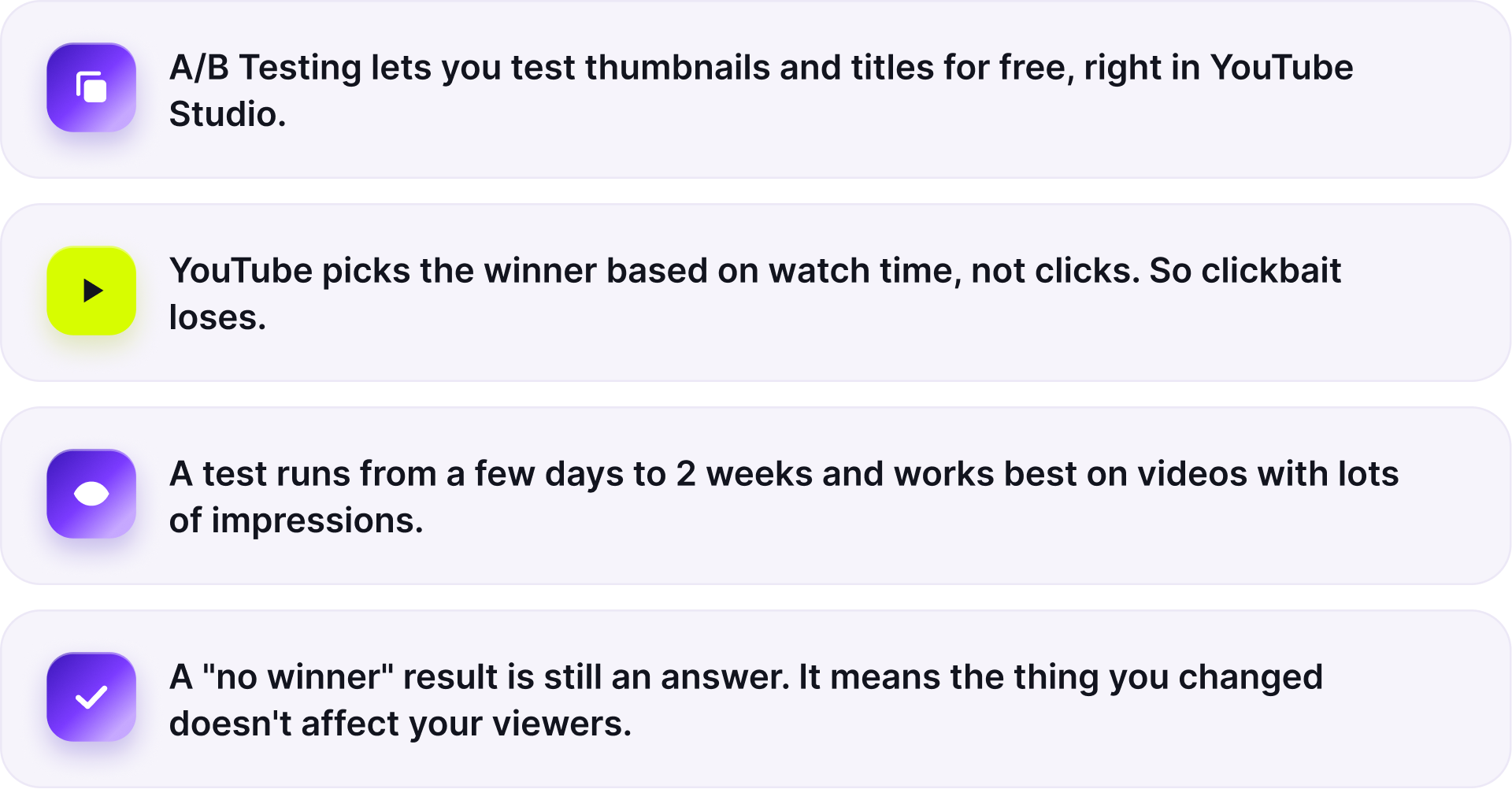
A/B Testing is a built-in tool in YouTube Studio that lets you compare different versions of your thumbnails, titles, or both. You can upload two or three versions, and YouTube will show them to different viewers at the same time. It then looks at how much watch time each version brings in and selects the best-performing one as the default for everyone.
YouTube trialed the feature with a small group of creators in 2023 and opened it to all channels in June 2024 under the name Test & Compare. Title testing followed in 2025. Today the button in Studio is called A/B Testing.
What about TubeBuddy and ThumbnailTest? They've offered the same thing for years, but they charge for it and have one big drawback. Third-party tools usually rotate versions, for example A on Monday and B on Thursday, so a thumbnail can "win" just because it landed on a good day. YouTube shows every version at once and pulls the data straight from its own system, which makes its results more reliable. Third-party tools still have their perks: test history, scheduling, and team access.
YouTube counts watch time, not just clicks
A/B Testing doesn't pick the thumbnail that gets more clicks. It picks the one people watch longer after clicking. YouTube calls this metric watch time share.
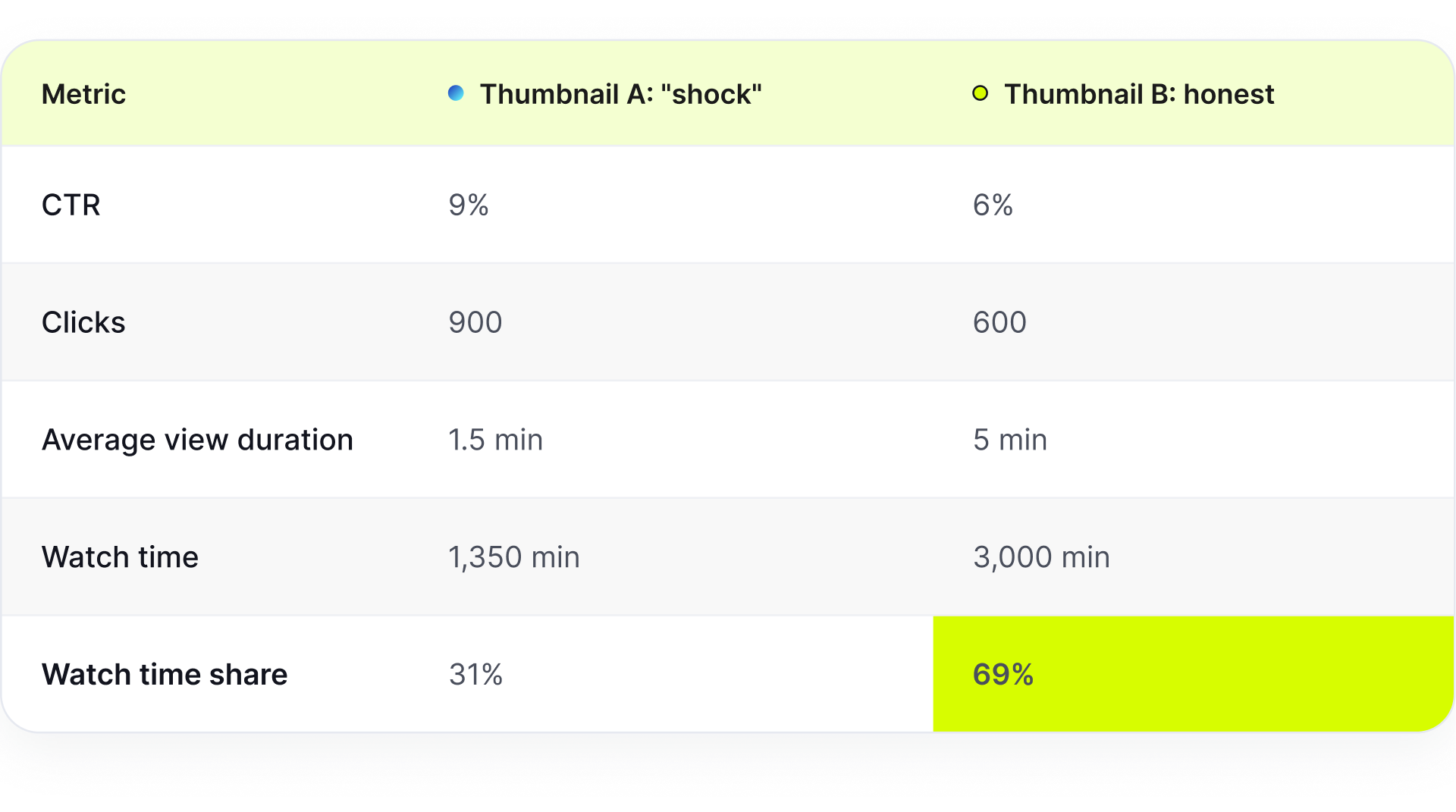
Let's say you're testing 2 thumbnails on a 10-minute video, and each one gets 10,000 impressions.
A test that only looked at CTR would hand the win to A. YouTube picks B, because that version brings in people who actually watch.
YouTube's recommendation system rewards videos that viewers are happy with, and the test follows the same logic. Clickbait doesn't win here.
To learn how retention affects a video's reach, read our breakdown of the YouTube algorithm.
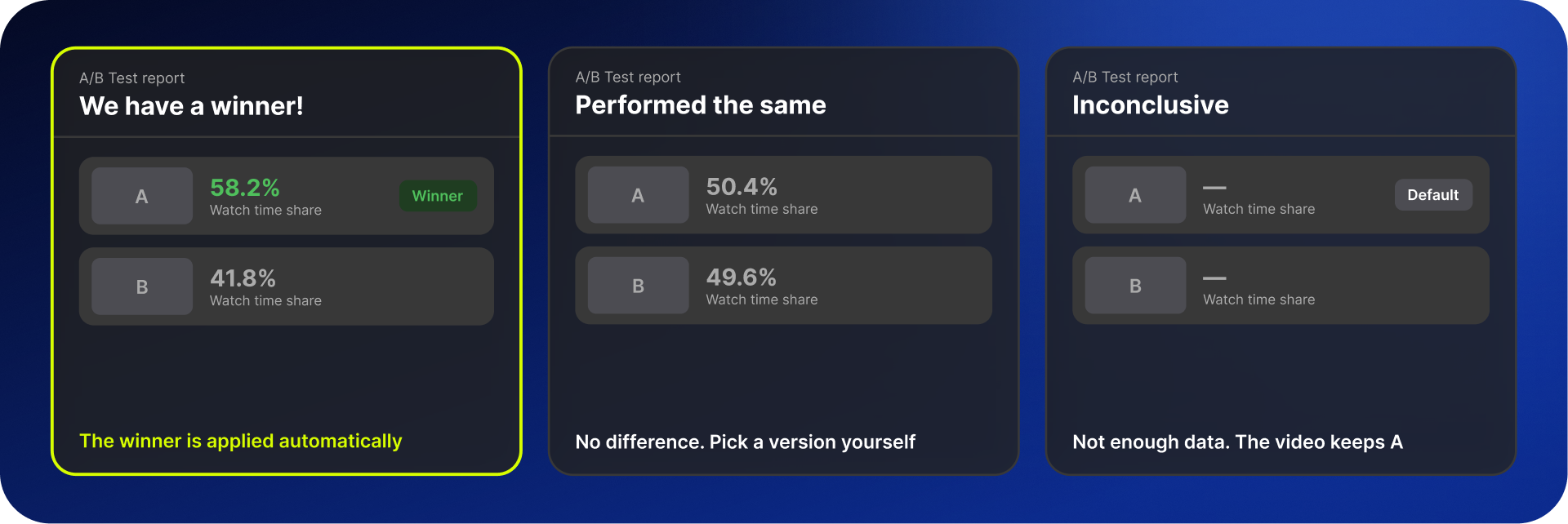
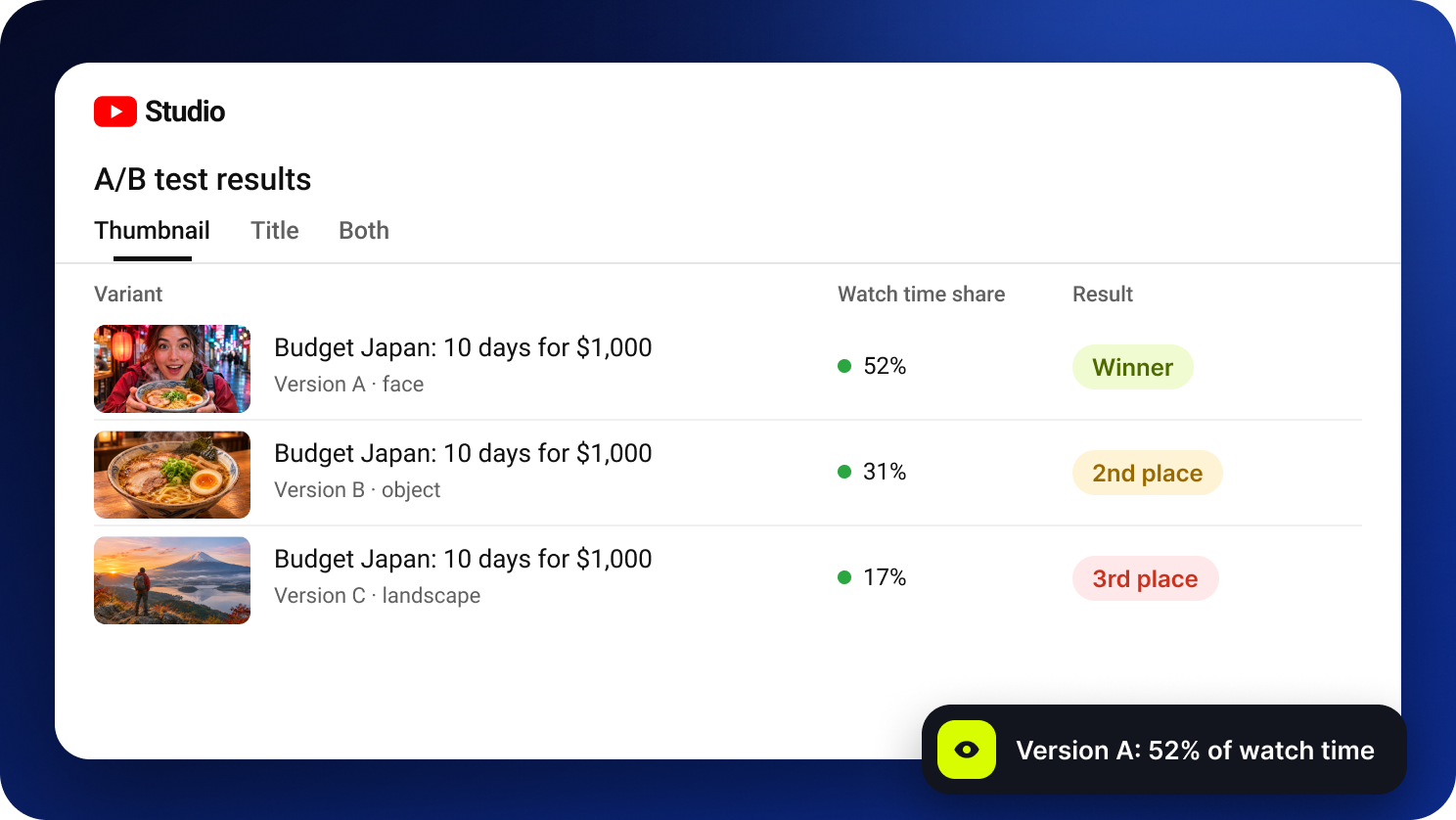
3 possible results
Older guides may call these results Winner, Preferred, and None.
Who can run a test: requirements and limits
Channel size and monetization don't matter. You only need 2 things: the desktop version of YouTube Studio (the mobile app doesn't have the feature) and advanced features turned on (Settings, Channel, Feature eligibility).
You can't test:
Shorts, including vertical videos up to 3 minutes long
Videos set as made for kids or age-restricted (18+)
Private videos
Scheduled live streams and Premieres before they air
Limits:
Up to 3 versions per test
A few days to 2 weeks per test
A thumbnail below 1280×720 drops every version to 480p
Any manual change to the title or thumbnail stops the test
How to set up a test in 2 minutes
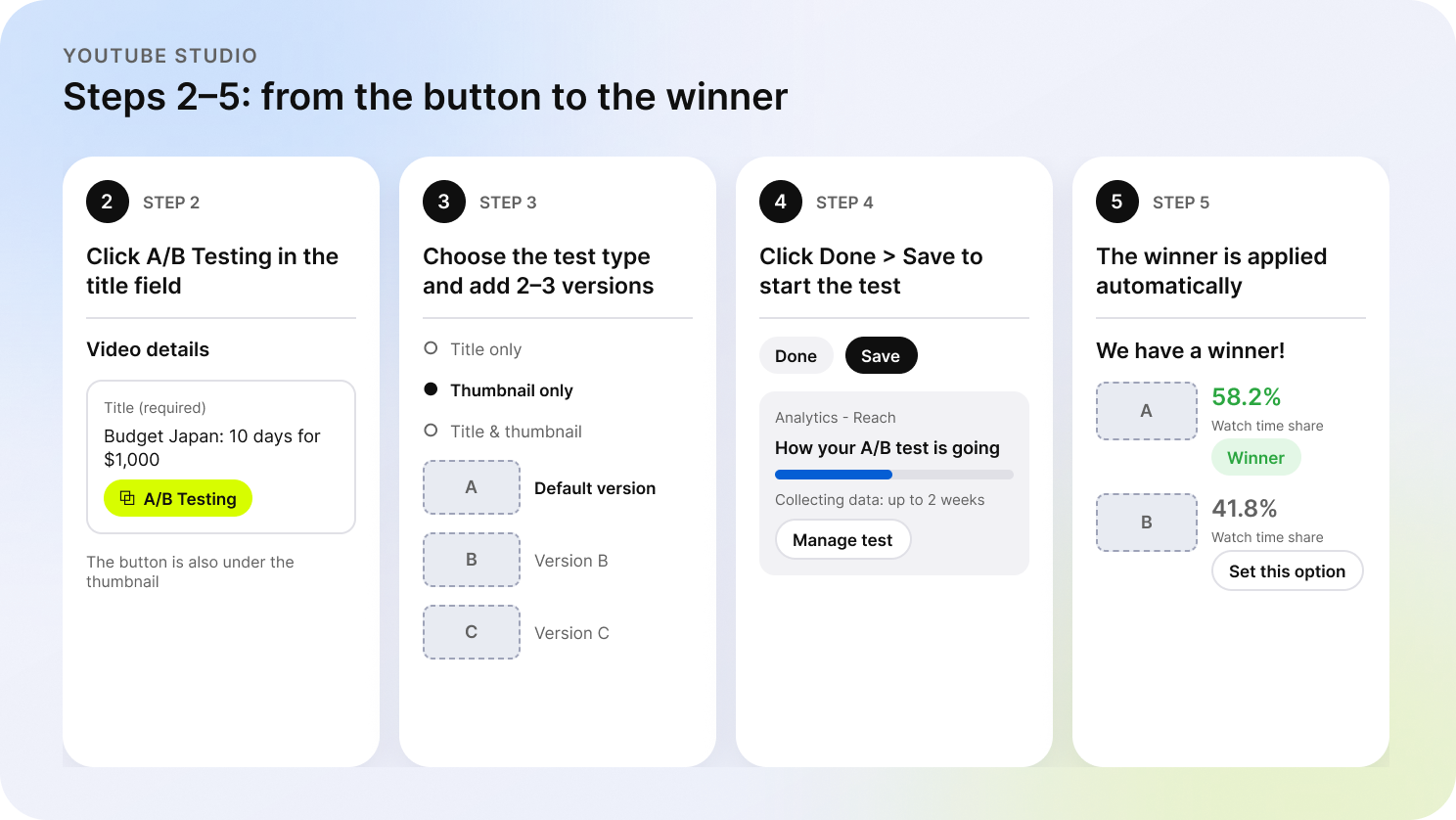
Open YouTube Studio on a computer. Go toContent and pick a video. For a new upload, click Create.
In the title field or under the thumbnail, click A/B Testing and choose what to test: the title, the thumbnail, or both.
Add 2–3 versions. The first one is the default: if there's no winner, it stays on the video.
Click Done, then Save. You can follow the test in Analytics (Reach) with the Manage test button.
Wait for the result. A winner is applied automatically; otherwise, you pick the version yourself.
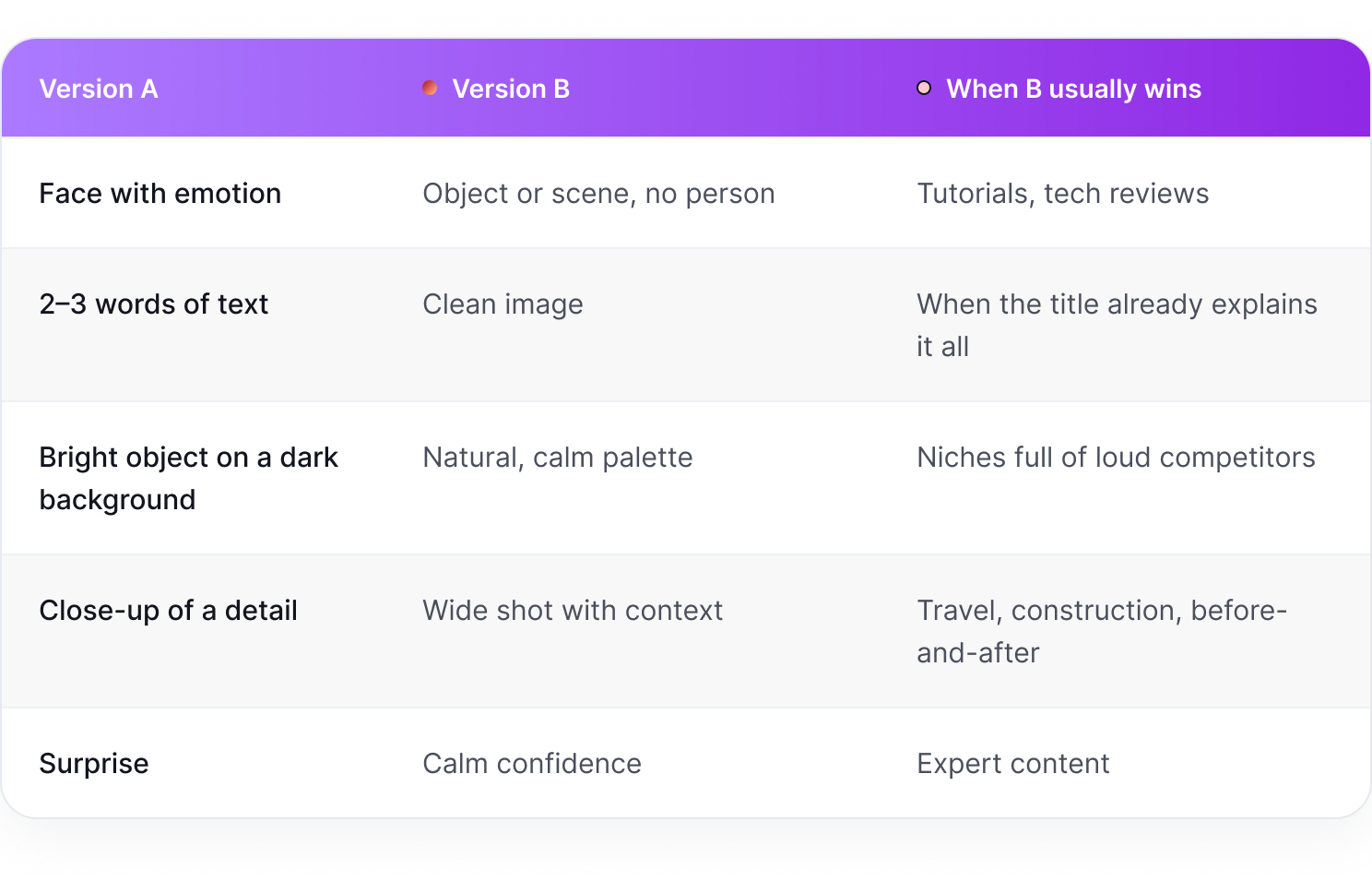
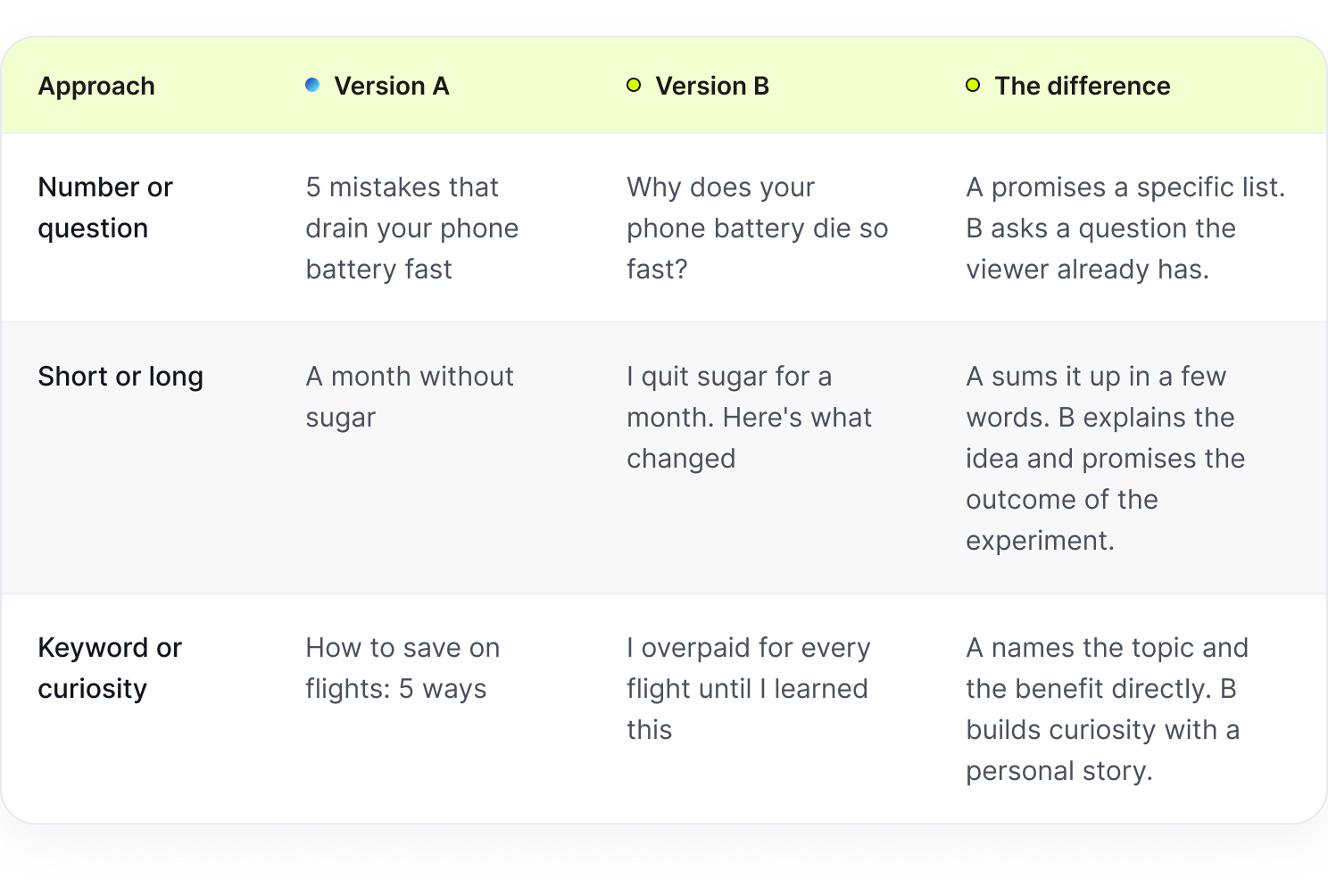
What to test: ideas for thumbnails and titles
If you shift the text on a thumbnail by 20 pixels, the test won't show a visible result. Clearly different versions like "problem" and "result" will give you a difference that's obvious and measurable.
Change only 1 element. If thumbnail B has a different face, a different color, and different text, a win only tells you that B is better. You won't know why, and you won't be able to repeat it in your next video.
How to read the results
The report shows the watch time share for each version.
"No winner" is still an answer. Performed the same means the element you changed doesn't matter to your viewers. If thumbnails with and without a face perform the same, stop arguing about faces and work on the topic or the first 30 seconds. Inconclusive usually means the versions were too similar or the video didn't get enough impressions.
To understand why the winner won, compare analytics for the test period with the weeks before it:
CTR up, retention unchanged, so the packaging got more appealing
CTR unchanged, retention up, so you brought in better-matched viewers, which is often worth more. The algorithm understood the video better and pushed it to the right audience.
Impressions up after the test, so YouTube started recommending the video more widely
CTR naturally drops as a video reaches a colder audience, so a lower number doesn't mean the video failed. More on this in our guide to what counts as a good CTR on YouTube.
5 common mistakes
Nearly identical versions. A different font size or shade of red won't change watch time.
A video that barely gets impressions. With a few hundred impressions a week, the test will run the full 2 weeks and still decide nothing.
Several changes at once. Even if that version wins, you won't know what worked.
Editing during the test. Any change to the title or thumbnail stops the test, and you'll have to start over.
Betting on CTR. Don't dismiss the test result just because another version had a higher CTR. YouTube picks the winner by watch time, not just clicks.
Does A/B Testing work?
Opinions on Reddit are mixed: "All my tests come back inconclusive," "Waited 2 weeks and got nothing." The complaints are real, but most of them are about the video the test ran on rather than the tool.
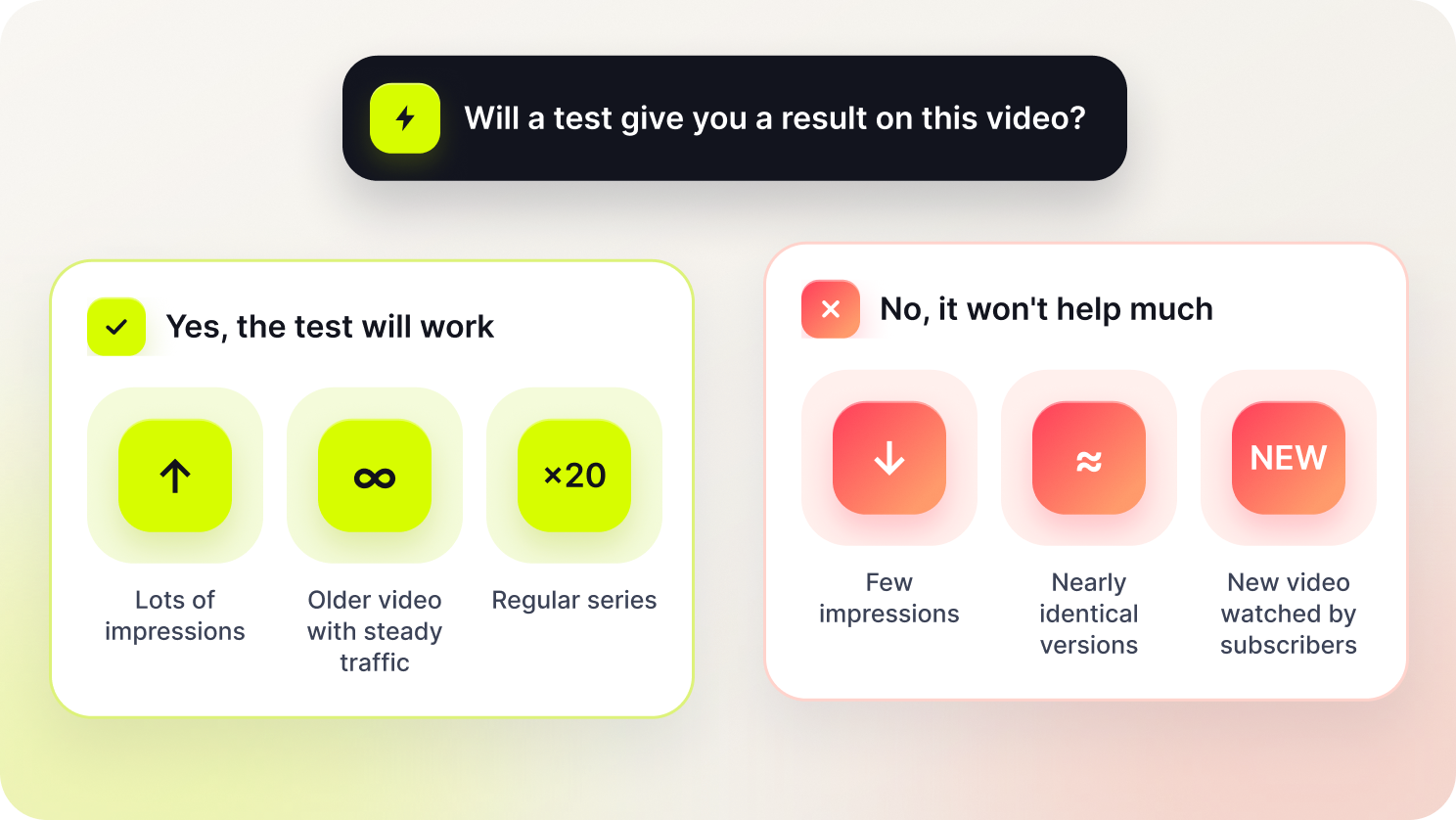
When it doesn't help much: a small channel with a few thousand impressions a week, nearly identical versions, or a new video watched mostly by subscribers. Regular viewers click on your video whatever the thumbnail looks like.
When it works best: videos with lots of impressions, especially older evergreen videos that keep getting search and recommendation traffic for months. A small improvement on a video like that keeps paying off for years, and you're not putting its launch at risk. Regular series are another good fit, since 1 test gives you an answer for the next 20 episodes.
A/B Testing won't save a weak video. But it does help you understand optimization and viewer behavior in practice.
Case study: how a SubSub network channel tested its thumbnail
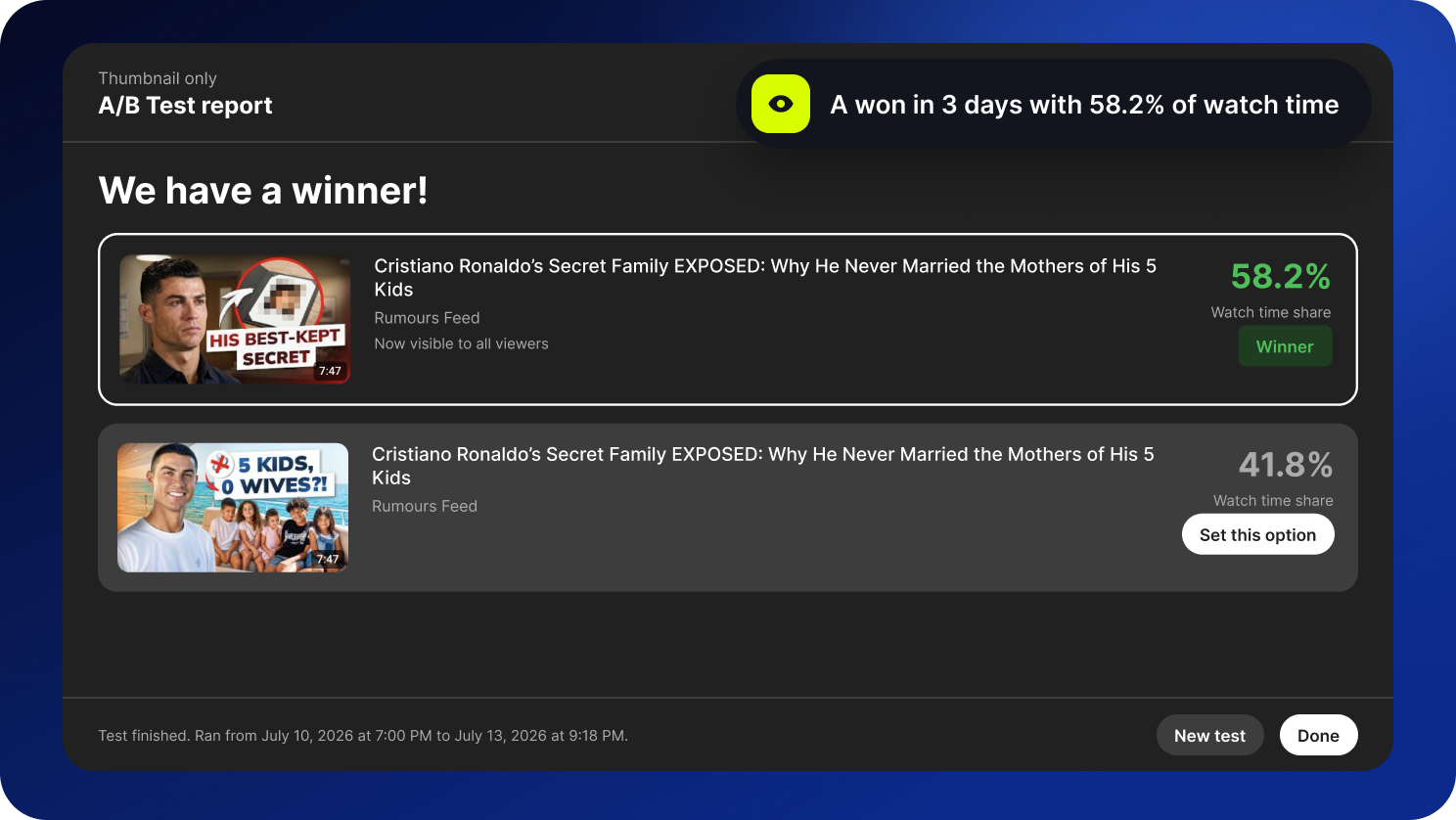
Rumours Feed, a channel in the SubSub network, tested 2 thumbnails for the video "Cristiano Ronaldo's Secret Family EXPOSED: Why He Never Married the Mothers of His 5 Kids." The title was the same in both versions; only the thumbnail changed.
What we compared: curiosity versus a direct answer. Version A had a serious, disappointed face, a blurred photo, and the text "HIS BEST-KEPT SECRET." Version B had the smiling star with his kids and the text "5 KIDS, 0 WIVES?!"
Watch time share: A 58.2%, B 41.8%
Test duration: July 10 to 13, 2026
Result: version A won, and YouTube showed it to all viewers right away
Why did version A win? Thumbnail B almost repeats the title word for word, so viewers get the answer before they click and have less reason to watch to the end. Version A leaves the question open. The people who clicked wanted to find out the "secret" and watched longer.
Conclusion
A/B Testing helps you understand which thumbnail brings in viewers who stay and watch. Pick videos with reach, make the versions truly different, change 1 element at a time, and trust minutes over clicks. After each test, write down what won and use it in your next videos. A few months of tests like this will teach you more about your audience than any checklist.
Grow faster with SubSub
Want to go into a test with a strong hypothesis? SubSub Analytics shows CTR benchmarks and thumbnail trends on competitor channels in your niche. The SubSub network gives you analytics, monetization support, and a team that helps your channel grow.
Can I test titles and thumbnails at the same time? Yes. The title and thumbnail mode lets you create up to 3 combinations, but then you won't know which element drove the result. To find out, test the title and the thumbnail separately.
How long does a test take? A few days to 2 weeks. The more impressions a video gets, the sooner you'll see a result.
Does A/B Testing affect views or the algorithm? It doesn't penalize your channel. During the test, though, some viewers see the weaker versions, so the video may lose a few views. That's why it's better to start with older videos.
Why is A/B Testing not showing for me? Check 3 things. Are you on a computer rather than a phone? Are advanced features turned on for your channel? Does the video meet the restrictions (Shorts, made for kids, 18+, and private videos aren't supported)?
Why does the winner have a lower CTR? Because YouTube picks the winner by watch time. Fewer clicks with longer views add up to more minutes.