Let’s say you already have dozens of videos with solid moments, good edits, and just enough material to create one simple channel trailer.
But when you sit back and think about how to create it, your brain goes blank. What music should you use, should you talk or not, explain what the channel is about, or just let the clips speak?
All the choices you make say a lot about what actually makes a good channel trailer.
Here’s a breakdown of what works, what doesn’t, and how to create a YouTube channel trailer that feels intentional, engaging, and true to your content without overthinking it into paralysis.
Key Takeaways
A YouTube channel trailer serves as your 30-90 second pitch to convert casual visitors into loyal subscribers
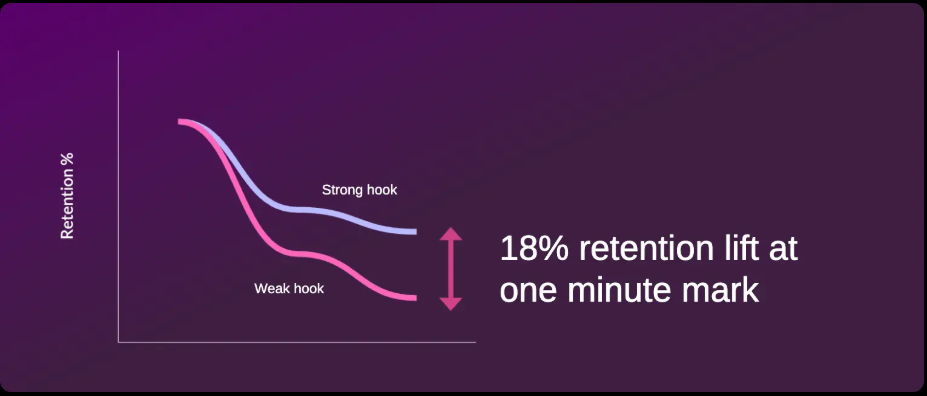
The most effective trailers hook viewers within 3 seconds and clearly communicate your channel's value proposition
Successful trailers follow a simple formula: attention-grabbing opening, content preview, personality showcase, and strong call to action
Tracking trailer metrics like click-through rate and subscriber conversion helps you refine your approach over time
Pay attention to the numbers; metrics like click-through rate and subscriber conversion reveal what’s working and where you can improve.
What Is a Channel Trailer on YouTube? And Do You Really Need One?
A YouTube channel trailer is basically your elevator pitch in video form: a quick 30–90 second snapshot that auto‑plays for anyone who hasn’t subscribed yet. It’s your chance to show newcomers what you’re about, why your content matters, and why they should hit that subscribe button before they click away.
The magic comes from grabbing attention in the first few seconds, showing clips that speak directly to your ideal audience, and ending with a clear, confident call to action, something as simple as “Subscribe for weekly tips”.
Now, when it comes to the whole “every serious YouTuber needs a trailer” debate, a lot of big channels skip trailers altogether and just spotlight their strongest video, especially when their content already speaks for itself.
But here's something that might surprise you: channels with optimized trailers see subscriber conversion rates higher than those without one, especially for medium and large channels..
For smaller or newer channels, trailers don’t always move the needle anyway; most visitors are too busy scanning thumbnails to pay attention to whatever auto‑plays. Plenty of creators say a trailer isn’t essential if your videos already hook people the moment they hit play.
So, a trailer becomes worth prioritizing once a channel starts gaining traction. If you’re sitting around the 1K‑subscriber mark or you’re getting steady traffic to your channel page, a quick preview of your style can nudge a few extra viewers into subscribing. And if you’re not planning to create something custom, the general consensus is simple: put your strongest video in that spot and let it do the heavy lifting.
Where Can Viewers Find Your Channel’s Trailer
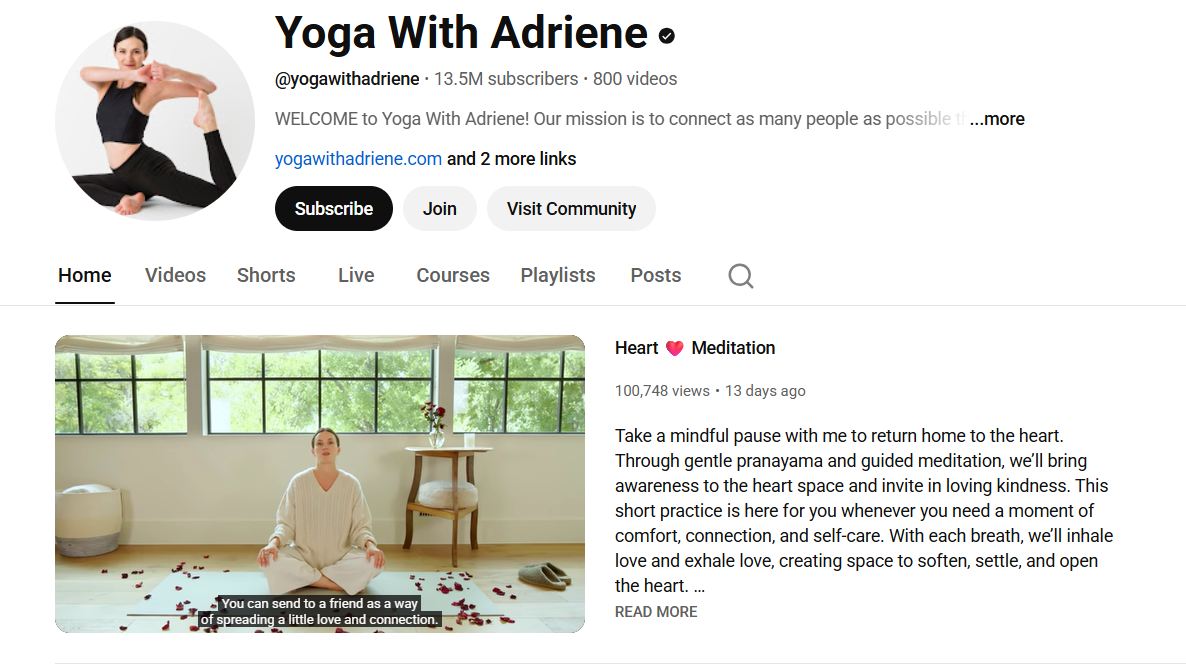
You’ll spot a YouTube channel trailer right at the top of a channel’s homepage: it’s the first thing non‑subscribers see, and it auto‑plays to give them a quick taste of what the channel is all about.
For new visitors, the trailer shows up as the very first video section on both desktop and mobile.
Subscribers, on the other hand, usually get a featured video or the latest uploads instead.
How to Make a YouTube Channel Trailer: A Step-by-Step Guide
Plan Your Script
Before you open your editing software, you need a script. Winging it almost never works for trailers because every second matters too much.
Here's a proven framework for structuring your YouTube channel trailer:
Step 1: The Hook (0-5 seconds): Open with something that stops scrollers in their tracks. This could be your most outrageous clip, a provocative statement, or a question that targets your ideal viewer's core frustration (think of a bold question or a striking visual tied to your niche, like “Want to 10x your views?”). The goal isn't to explain anything yet, just to create enough curiosity that they keep watching.
Step 2: The Introduction (5-15 seconds): Now you've earned a few seconds of attention. Use them to establish who you are and what your channel covers. Be specific. "I'm a fitness coach" is forgettable. "I help busy professionals build muscle in 3 hours a week without stepping foot in a gym" is memorable.
Step 3: The Value Proposition (15-30 seconds): This is where you answer the viewer's unspoken question: "What's in it for me?" Explain what problems you solve, what entertainment you provide, or what knowledge you share (e.g., “Weekly AI SEO breakdowns”). Use clips from your existing content to illustrate your points.
Step 4: The Credibility Boost (30-45 seconds): Why should anyone trust you? This could be your background, your results, your subscriber count, brands you've worked with, or testimonials from your community. Don't be arrogant, but don't be falsely modest either.
Step 5: The Call to Action (45-60 seconds): Tell viewers exactly what to do next. "Subscribe and hit the bell" is standard, but you can make it more compelling by tying it to specific benefits. "Subscribe now so you don't miss next week's video where I reveal the exact workout split that helped me gain 15 pounds of muscle."
Edit the Video
Gather your assets: your strongest A-roll clips, supporting b-roll, royalty-free music, sound effects, and your channel logo or intro animation. Keeping assets organized saves time once you’re in the edit.
Use tools like CapCut, Premiere, or Descript: import everything and trim the clip. Start by cutting your main talking points first. Remove pauses, filler words, and anything that slows momentum. Aim for tight 2–4 second visual changes when possible to keep the screen dynamic, especially in the first 30 seconds. Add b-roll to cover jump cuts and reinforce what you’re saying. If you mention a tool, show it. If you reference a result, display it on screen. This keeps viewers engaged and improves retention.
Add captions: most people watch muted, so full text overlays are essential. Use clear, easy-to-read text with high contrast. Highlight key phrases instead of overcrowding the screen.
Layer in music, voiceover, and your end‑screen CTA: background music should support your voice, not compete with it. If you’re using voiceover, clean up background noise and balance audio so everything sounds consistent from start to finish. Finally, add your end screen. Include a clear call to action such as “Subscribe,” “Watch Next,” or a specific video recommendation. Use YouTube’s end screen elements strategically to keep viewers on your channel.
Export in 16:9 (1920×1080), 30fps, high quality: double-check audio levels and playback before uploading so your video looks sharp and sounds professional on any device.
The actual production process looks like this:
Write your script following the framework above
Record your talking head segments (or voiceover)
Pull your best clips from existing content
Edit everything together with tight pacing
Add music that matches your channel's energy
Include subscribe graphics and end screens
Watch it with fresh eyes the next day and cut anything that drags
If you’re unsure where to start or maybe want to create a trailer for a faceless channel, you can whip up a polished trailer version with AI tools. These can help you with the script, visuals, voiceover, and editing, so you get pro‑level results with barely any effort. Examples of AI tools include Descript, OpusClip, or HeyGen.
Study Winning Channel Trailers with Real Data
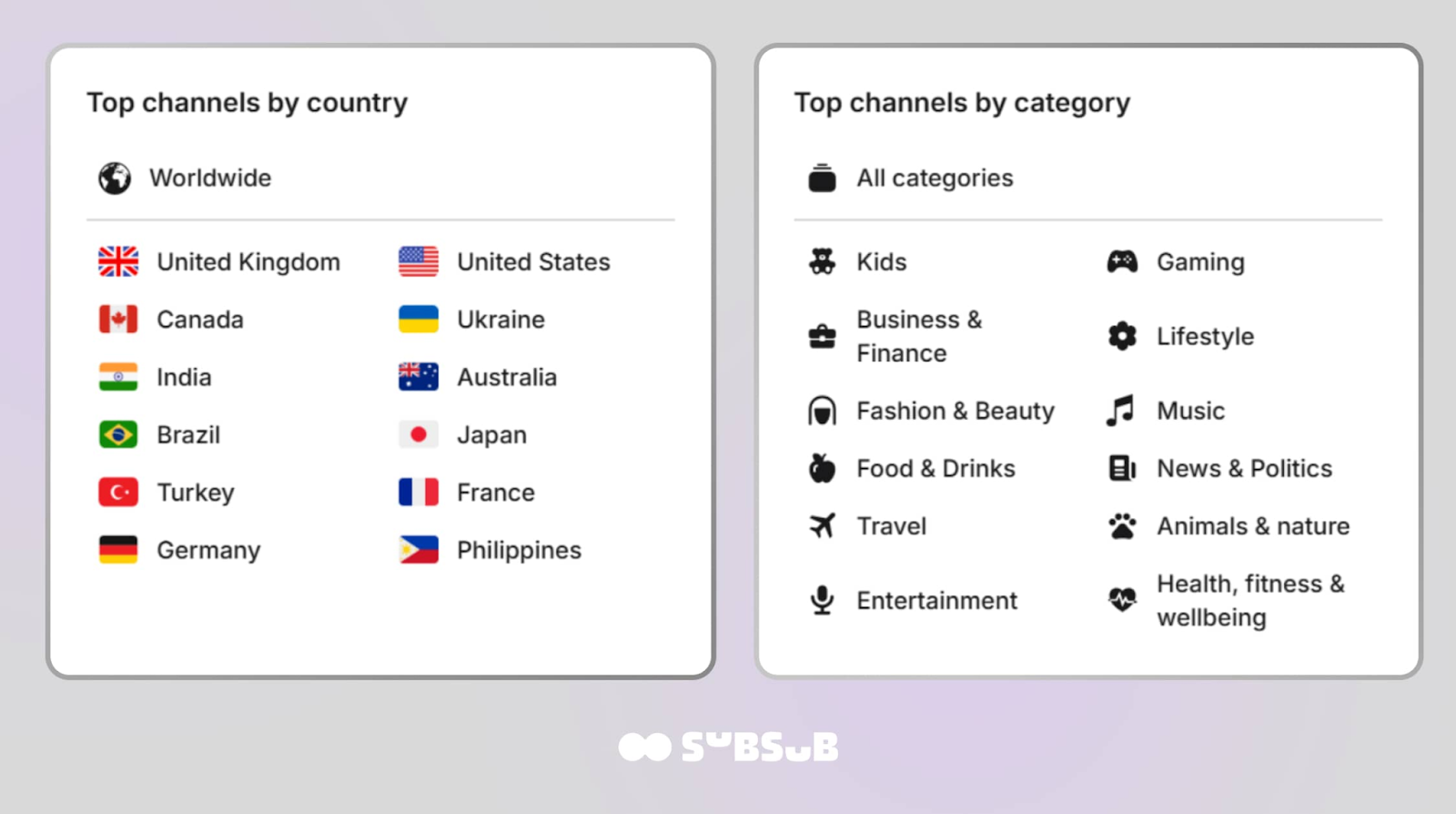
You’re likely curious how top creators position themselves and create their trailers. Instead of wasting a lot of time and browsing endlessly on YouTube, you can use a free and open platform from SubSub. Our YouTube Stats & Analytics tool lets you explore the most viewed and most subscribed channels across 130+ countries and 10 major categories, from music to gaming.
It’s a practical research tool when you’re figuring out how successful channels frame their value and present themselves in a trailer.
This tool lets you go beyond surface-level numbers. You can dig into detailed data, zoom in on specific niches, and spot creators who dominate their region. Sort by country, category, and metrics like most viewed or most subscribed. A few clicks, and you’ve got real examples to analyze.
YouTube Channel Trailer Best Practices: Content, Length, and Call to Action
Over the recent years, YouTube channel trailers that actually stick are the ones that hit fast and land hard. Think 30–90 seconds, built for mobile, packed with a sharp hook and a clear CTA that turns curious visitors into subscribers.
The formula is simple: high‑energy clips, clean captions, and branding that pops. Attention spans are shrinking, and the algorithm knows it, so every second has to earn its place.
What works best:
Hook in the first 3–5 seconds: a bold question, surprising stat, or eye‑grabbing visual keeps as many viewers as possible watching.
Show, don’t tell technique: use quick cuts of your strongest content, results, or testimonials to prove your value instantly.
Optimize for silent viewing: captions are non‑negotiable since 85% of people watch muted. Add an end‑screen CTA around the 80% mark (near the end of the video) and keep your logos/colors consistent.
Follow a simple script arc: quick origin story → what your channel delivers → highlight reel → subscribe invite.
Test and refresh: build mobile‑first (since mobile video viewing keeps climbing every single year), A/B test thumbnails, update your trailer every quarter, and track drop‑offs in YouTube Studio to see where viewers bail.
From a psychological perspective, you want to show personality without being self-indulgent. You need to explain your content without boring people with details. You must ask for the subscription without sounding desperate. Getting this balance right separates trailers that convert from those that drive people away.
The good news is that effective trailers follow recognizable patterns. Once you understand the underlying structure, you can adapt it to fit your specific niche and personality.
Element
Best Practice
Why It Matters
Length
30–90 seconds
Aligns with 2026 attention spans
Hook
3–5 second grabber
Most viewers decide in the first 5 seconds
Captions
Accurate, full coverage
85% muted views
CTA
At 80% + end screen
Maximizes conversions
Mobile
Smartphone-tested
Huge traffic from mobile video consumption
What to Avoid with Your Channel Trailer
We’ve watched hundreds of channel trailers over the years, and the gap between good and bad is staggering. The best ones make you feel like you've discovered something special.
The worst ones feel like watching someone read their resume aloud. But the good news is that you don’t need expensive equipment or a production studio to create an effective trailer. You just need to understand what makes someone hit that subscribe button and apply the right YouTube channel trailer tips.
Theory only takes you so far. Seeing how successful creators implement these principles helps bridge the gap between understanding and execution. These YouTube channel trailer examples represent different approaches that work for different types of content.
Effective Trailer Techniques and Strategies
The Education-First Approach Channels like Veritasium and Kurzgesagt open their trailers with fascinating facts that demonstrate their content's value immediately. Veritasium's trailer doesn't start with "I make science videos." It starts with a mind-bending scientific concept that makes you think "Wait, what?" That curiosity drives the subscription.
What makes this work:
Leads with value, not self-promotion
Demonstrates expertise through example
Creates desire to learn more
Appeals to intellectual curiosity
The Personality-Forward Approach
Entertainment channels like MrBeast and Emma Chamberlain lean heavily into personality. Their trailers are essentially highlight reels of their most charismatic moments. The content matters less than the feeling you get watching them.
Key techniques:
High energy from the first frame
Quick cuts maintaining momentum
Showcases the creator's unique voice
Makes viewers feel like they're missing out
The Problem-Solution Approach
How-to channels like Ali Abdaal and Thomas Frank structure their trailers around viewer problems. They identify pain points their audience experiences, then position their content as the solution.
Elements that convert:
Opens with a relatable frustration
Promises specific outcomes
Backs claims with results
Creates urgency to implement advice
The Community Approach
Some creators, particularly in gaming and lifestyle niches, focus on the community aspect. Their trailers emphasize belonging, so subscribing means joining a group of like-minded people.
Effective tactics:
Shows community interactions
References inside jokes or recurring themes
Highlights comment section engagement
Makes subscription feel like membership
Regardless of approach, successful trailers share a common DNA. They respect the viewer's time. They communicate a clear value proposition. They show rather than tell whenever possible. And they end with an unmistakable call to action.
How to Add a Trailer to Your YouTube Channel
The process of learning how to add a trailer to your YouTube channel is straightforward, but the settings matter more than most creators realize.
Step-by-step implementation:
Upload your trailer as an unlisted or public video (unlisted works fine and keeps it off your main feed)
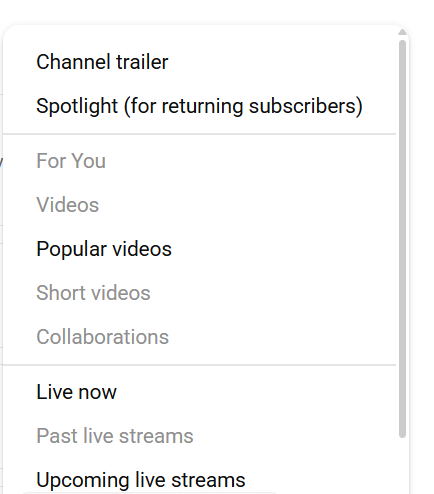
Click “Add section” to choose between “Channel trailer” and “Spotlight" section.
4. Select your trailer from your uploads.
5. Click "Publish" to save changes.
Important settings to configure:
Enable the featured video for unsubscribed viewers specifically
Consider setting a different video for subscribed viewers (a recent upload works well)
Ensure your trailer's thumbnail is compelling; it appears on your channel page
Check that your trailer displays correctly on mobile devices
Placement considerations:
Your trailer appears prominently on your channel homepage, but only for viewers who aren't subscribed. This means your existing audience won't see it unless they sign out or use incognito mode. Test your trailer's appearance by viewing your channel while signed out.
The trailer also affects your channel's browse features. YouTube sometimes pulls trailer content into channel recommendations, so ensure your trailer represents your brand accurately.
Optimize Your Channel Trailer
Creating a great trailer is only half the battle. You also need to implement it correctly and refine it based on performance data. Many creators make excellent trailers that underperform because of technical mistakes or failure to iterate.
Optimization strategies:
Test different versions by swapping trailers monthly and comparing performance. Keep variables limited: change one element at a time so you know what caused any improvement or decline.
Update your trailer when:
Your content direction changes significantly
You hit subscriber milestones worth mentioning
Your production quality improves noticeably
Current trailer metrics plateau or decline
You develop new signature content or series
Most successful creators refresh their trailers every 6-12 months. Your channel evolves, and your trailer should reflect your current best work, not what you were capable of a year ago.
Track Trailer Performance and Make Data-Driven Improvements
Your YouTube channel trailer isn't a "set it and forget it" asset. The best creators treat it as an ongoing experiment, refining based on data and changing as their channel evolves.
Key metrics to monitor:
Watch time percentage: If viewers drop off at specific points, those sections need work
Click-through rate on end screens: Low rates suggest weak calls to action
Subscriber conversion: Compare new subscribers to trailer views
Audience retention graph: Shows exactly where you lose people
Access these metrics through YouTube Studio > Analytics > select your trailer video > Engagement tab.
And here’s where SubSub Analytics becomes a game‑changer. Beyond your own trailer metrics, SubSub lets you analyze competitors’ subscriber growth, engagement patterns, content formats, and top‑performing topics. You can see what’s working for them, what’s falling flat, and how their channel structure guides viewers.
That means you’re not just optimizing your trailer in isolation; you’re refining it with real competitive intelligence, giving you a clearer path to outperform channels in your niche.
Interpreting the data:
Steep drop-off in first 5 seconds = weak hook
Gradual decline throughout = pacing issues
Sharp drop at specific moment = problematic content
Low end screen clicks = unclear or weak CTA
Final Thoughts
The key takeaway from everything we've covered is this: your YouTube channel trailer is a conversion tool. Every second should earn its place by moving viewers closer to hitting subscribe.
Use a simple structure: hook, intro, value, credibility, and a clear call to action. Keep it 45–60 seconds, never longer than 90. Lead with your strongest moment and finish with a direct ask. Then review your trailer with fresh eyes: does it grab attention, explain the value, and ask for the subscription? If not, you know what to refine.
Plus, you can rely on SubSub Analytics, the ultimate tool that gives you a behind‑the‑scenes look at what successful channels are doing right. Closely analyze competitor performance: who their trailers attract, how viewers respond, and what drives engagement. You gain practical insights you can apply to your own trailer. It’s a powerful way to spot patterns, uncover opportunities, and make confident, data‑driven creative choices.
The creators who win on YouTube are the ones who treat every touchpoint, including their YouTube channel trailer, as an opportunity to convert casual viewers into loyal fans.
FAQs
How do you make a channel trailer on YouTube?
Create a YouTube channel trailer by scripting a short, structured video: start with a 5-second hook, introduce yourself, explain your value, show credibility (background or results), and end with a clear call to action. Record and edit the clips, then upload the finished video to YouTube.
How to add a trailer to your YouTube channel?
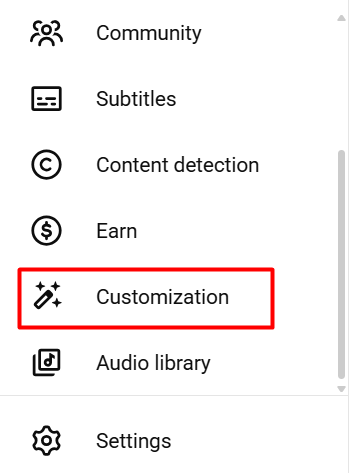
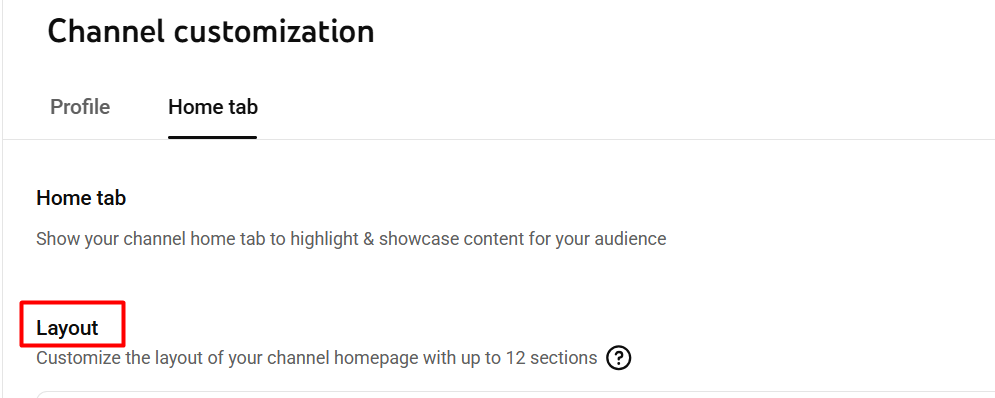
Go to your YouTube channel, open the Customize Channel section, and select the Layout tab. Under ‘Video spotlight,’ choose the option for returning or new visitors. Click ‘Add’ or ‘Change,’ pick the video you want to feature as your trailer, and publish your updates to make it live on your channel.
How long should a YouTube channel trailer be?
The ideal length falls between 30-90 seconds, with 45-60 seconds being the sweet spot for most channels. Shorter trailers don't provide enough information for viewers to make a subscription decision. Longer trailers ask too much commitment from someone who doesn't know you yet.
Can I use copyrighted music in my channel trailer?
Using copyrighted music without a license risks having your trailer muted or taken down entirely. Stick to royalty-free music from YouTube's Audio Library, or purchase licenses from services like Epidemic Sound or Artlist. The small investment protects your trailer from content claims.
How often should I update my YouTube channel trailer?
Plan to refresh your trailer every 6-12 months, or whenever your channel undergoes significant changes. If your content style evolves, you hit major milestones, or your production quality improves substantially, it's time for an update. Monitor performance metrics—declining engagement signals the need for a refresh.
Should my trailer be public or unlisted?
Either works, but unlisted keeps your trailer from appearing in your regular upload feed and search results. Since the trailer serves a specific purpose (converting channel page visitors), unlisted prevents it from competing with your regular content for views and potentially confusing your audience.


%20(1).jpg)

.jpg)
.jpg)